Citizen PDemo for POS Print
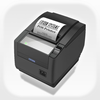
Citizen PDemo for POS Print Summary
Citizen PDemo for POS Print is a mobile iOS app in Business by CITIZEN SYSTEMS JAPAN CO., LTD.. Released in Mar 2013 (13 years ago). Store metadata: updated Jan 5, 2026.
Store info: Last updated on App Store on Jan 5, 2026 .
0★
Ratings: 0
Screenshots


App Description
Description
Citizen PDemo for POS Printer is free demo application for Citizen POS Printer.
You can easily print texts and QR codes to a Citizen POS printer connected via the Wi-Fi / Bluetooth / USB (Lightning) interface of your iOS device.
[Key Features]
- Sample receipt printing
- Text printing
- QR code printing
- Photo/Image printing
- Logo/Watermark Registration
- Web page printing
- Sending file
- Peripheral Control
[Supported Printers]
- CT-S801/851/601/651/801II/851II/601II/651II/801III/851III/310II/251/751/4500
- CT-D101/150/151
- CT-E351/651
- CMP mobile printers
[Supported Interface]
- Wireless LAN
- Bluetooth
- USB(Lightning)
Remarks
* This app is implemented using the Citizen POS Print SDK.
If you want to create a new application for printing with a Citizen POS printer, please download and use the Citizen POS Print SDK from our website.
* To set the memory switch of the printer, please install and use the Citizen POS Printer Utility of our iOS App.
* Web site URL for SDK
https://www.citizen-systems.co.jp/en/printer/download/#sdk
* iOS POS Printer utility
https://apps.apple.com/us/app/citizen-pos-printer-utility/id1160558983
Thank you for your interest in CITIZEN POS Printers!