PDF it All Document Converter

PDF it All Document Converter Summary
PDF it All Document Converter is a free, with in-app purchases iOS app in Productivity by DIGISET LLC. Released in Apr 2013 (13 years ago). It has 26K ratings with a 4.81★ (excellent) average. Based on AppGoblin estimates, it reaches roughly 67K monthly active users and generates around $<10K monthly revenue (100% IAP / 0% ads). Store last updated Oct 3, 2026
Recent activity: 15 new ratings this week View trends →
PDF it All Document Converter SDKs Summary
App not yet scanned for SDKs.
4.81★
Ratings: 26K
Screenshots


App Description
PDF it All Documents Converter : Your All-in-One PDF Converter
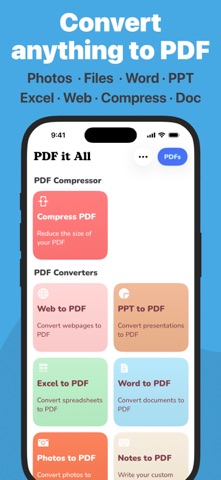
PDF it All is an advanced yet user-friendly tool designed for seamless PDF file editing and conversion. With this application, you can effortlessly compress large PDF files, making file sharing more convenient. Convert a variety of formats, including Word, Excel, PowerPoint, web pages, and photos into PDF with ease.
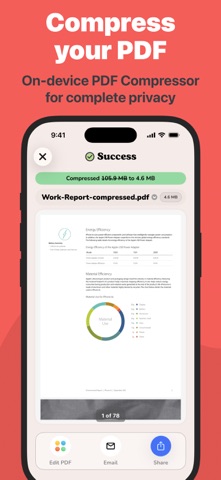
Whether you need to edit a PDF by removing or rotating pages, PDF it All has you covered. Merge multiple PDFs into a single file or split a PDF into multiple files effortlessly. The best part? Our app operates solely on your device, ensuring that all your PDF tasks are performed securely without relying on external servers. Your files remain 100% secure throughout the process.
Experience the convenience of multiple apps neatly bundled into one with PDF it All:
+ PDF Compress
Reduce PDF file sizes by up to 90%, perfect for streamlined file sharing and storage efficiency.
+ Office to PDF
Transform Word, Excel, or PowerPoint documents into PDF format within seconds. Simply select the office file, and let our app handle the rest.
+ Web to PDF
Capture your favorite web pages offline by converting them into PDFs using our built-in browser – a seamless process in just three steps.
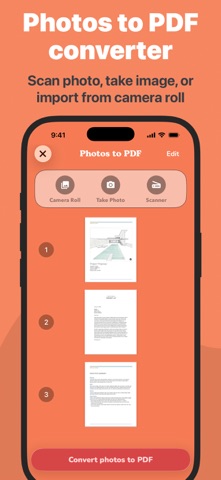
+ Photos to PDF
Digitize your photos from your camera roll or snap a picture on the spot. Create PDFs from your photos in a matter of seconds.
+ Notes to PDF
Craft your own PDFs with our rich text editor, enabling you to create complete PDF documents directly from your device.
+ PDF Editing
Unlock powerful PDF editing capabilities with our app, allowing you to:
• PDF Page Removal
Easily remove one or more pages from your PDF by importing the file and selecting the pages for removal.
• PDF Page Rotation
Correct rotated PDFs swiftly by rotating the entire document or specific pages with ease.
• Merge PDF
Combine multiple PDFs into a unified document effortlessly.
• Split PDF
Divide a PDF into multiple files by importing, selecting the split points, and letting our app handle the rest.
• Sign PDF
Sign documents quickly by opening your PDF, selecting "Sign," adding your signature, and you're done.
• Protect PDF
Enhance security by encrypting your PDFs with password protection, ideal for safeguarding private documents.
• Unlock PDFs
Remove known passwords fr