Geometry Ace: Math Tutor

Geometry Ace: Math Tutor Summary
Geometry Ace: Math Tutor is a mobile iOS app in Education by Interactive Mindware LLC. Released in Apr 2013 (13 years ago). It has 4.00 ratings with a 5.00★ (excellent) average. Based on AppGoblin estimates, it reaches roughly 2.00 monthly active users . Store metadata: updated Feb 26, 2018.
Store info: Last updated on App Store on Feb 26, 2018 .
5★
Ratings: 4.00
Screenshots


App Description
Geometry Ace is a fusion between a graphics based calculator and a geometry textbook. Detailed step-by-step solutions update as you create new math problems by changing the graphics. Learn vocabulary with unlimited examples. Points, Lines, Segments, Rays, Angles, Triangles, Quadrilaterals, Polygons, and Circles. Transformations and Constructions. Full functionality with no ads or in-app purchases. Great classroom or home resource for elementary, middle, and high school students and teachers.
*** Easy Start-up ***
• Simply choose shape to study.
• Shape will already be on the screen and all you have to do is start manipulating it.
• Learn vocabulary, choose from list of tutorials, perform transformations, or create a construction.
*** Detailed problem solutions update as you change the graphics. ***
• You are not limited to a set of pre-written or randomly generated problems.
• Tutorial examples: finding the length of a line segment, finding the area of any type of quadrilateral, calculating the length of an arc, and many more.
• Geometry Ace does not simply calculate lengths and areas for you. It shows you step-by-step how to do it!
*** Includes introductory material and makes connections with algebra. ***
• Introductory material appropriate for upper elementary students is included.
• Helps with differentiation. Middle and high school students who need a refresher can review introductory topics.
• Algebra topics needed for coordinate geometry are included.
• Introductory topics include coordinates of a point, slope, and the equation of a line.
• Answers to problems are given in fraction form when possible.
• Solutions address common student misconceptions and give attention to detail.
*** Interactive definitions ***
• Relevant definitions highlight interactively as you drag points and lines to change the shape on the screen to meet various attributes.
• Example: A triangle can be obtuse, oblique, and scalene.
• Example: A polygon can be concave and irregular.
• Definitions are inclusive. Example: A quadrilateral that is a rectangle is also a parallelogram and a trapezoid.
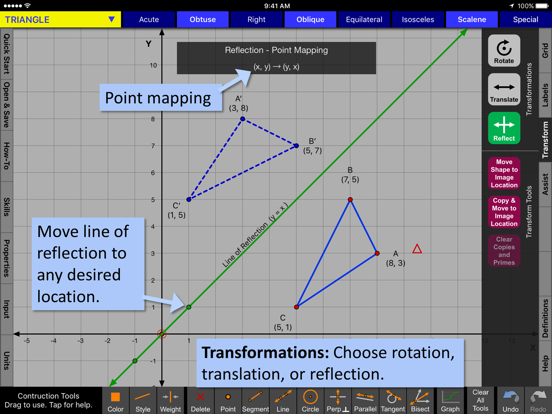
*** Transformations: Rotations, Reflections, and Translations ***
• Easily change degrees of rotation, center of rotation, line of reflection, and translation vector.
• Point mapping is shown!
• Perform successive transformations on the same objec