PDF: Lock & Unlock
PDF: Lock & Unlock Summary
PDF: Lock & Unlock is a ad-supported, with in-app purchases iOS app in Tools by Hardik Dhameliya. Released in Dec 2022 (3 years ago). It has 14 ratings with a 3.29★ (mixed) average. Based on AppGoblin estimates, it reaches roughly 31 monthly active users and generates around $<10K monthly revenue (27% IAP / 73% ads). Store metadata: updated Sep 7, 2025.
Store info: Last updated on App Store on Sep 7, 2025 .
3.29★
Ratings: 14
Screenshots


App Description
Instantly lock and unlock PDF password using PDF: Lock & Unlock.
Your PDF will be locked or unlocked and ready for download within seconds.
Most PDFs can be unlocked!
Files with an owner password can be unlocked instantly. However, if the file is thoroughly encrypted, you can only unlock the file by providing the correct password.
PDF: Lock & Unlock is the ultimate solution for managing your PDF files with ease and efficiency. Whether you need to secure, edit, or convert PDFs, this powerful iOS application provides all the essential tools in one place.
Key Features:
Secure & Protect Your PDFs
* Lock PDF – Set a strong password to restrict unauthorized access.
* Unlock PDF – Remove password protection from encrypted PDFs easily.
Edit & Modify PDFs
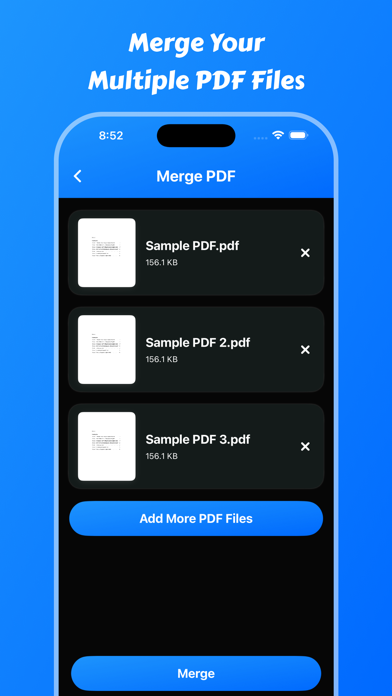
* Merge PDF – Combine multiple PDF files into a single document in seconds.
* Page Remover – Delete unwanted pages from a PDF for a cleaner document.
* Extract Pages – Select and save specific pages from a PDF as a new file.
* Add Watermark – Protect your PDFs with custom text or image watermarks.
Text Extraction & Recognition
* Text Scanner (OCR) – Scan printed or handwritten text and convert it into digital text.
* Text Recognize – Detect and extract text from images or PDF documents with high accuracy.
* PDF to Text – Convert PDFs into plain text files for easy editing.
Sign & Authenticate Documents
* Digital Signature – Add legally binding electronic signatures directly to your PDFs.
Convert & Share PDFs
* Web to PDF – Save web pages as PDFs for offline reading and sharing.
* Fast & Secure Sharing – Share PDFs via email, cloud storage, or messaging apps.
How to remove passwords from PDF files:
1. Select your PDF document.
2. Enter your password.
3. Select the option to remove the password.
4. File will save in saved files.
5. Users can share saved pdf files
Features:
- Users can lock and unlock pdf files.
- It is easy to use.
- Users can get all saved pdf files.
- Users can share pdf files.
- Users can delete pdf files.
- Users can view pdf files.
Main Features :
- Lock PDF – Protect your PDFs with a secure password to prevent unauthorized access.
- Unlock PDF – Remove password protection from PDFs for hassle-free access.
- Merge PDF – Combine multiple PDFs into a single document with just a few taps.
- Add Watermark – Insert custom watermarks to protect your docum