Fonto - story font for IG

Fonto - story font for IG Summary
Fonto - story font for IG is a free, ad-supported, with in-app purchases iOS app in Tools by ZEEBAVERSE LLC. Released in Mar 2023 (3 years ago). It has 16K ratings with a 4.87★ (excellent) average. Based on AppGoblin estimates, it reaches roughly 58K monthly active users and generates around $<10K monthly revenue (40% IAP / 60% ads). Store last updated Jun 26, 2026
Recent activity: 88 new ratings this week View trends →
Fonto - story font for IG SDKs Summary
Fonto - story font for IG was last scanned for SDKs on 2026-07-26. No known SDKs were detected. Check the raw list of SDK parts detected here and feel free to request unknown SDKs be added to AppGoblin.
4.87★
Ratings: 16K
Screenshots



App Description
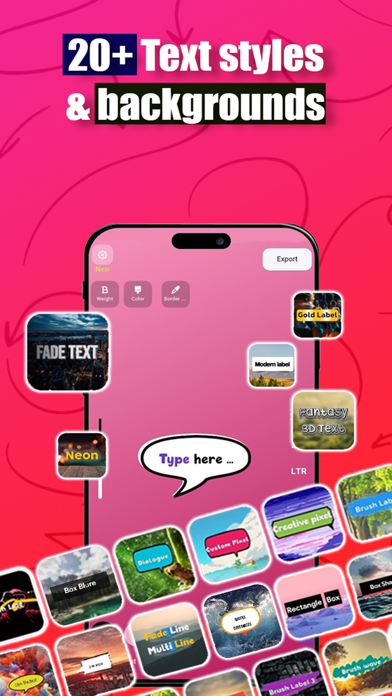
Fonto - Story font for Instagram, enables you to create attractive Instagram stories, without being limited to default Instagram fonts. As a result, views of your Instagram stories increase and the audience stays longer on your stories.
In fonto - Story font for Instagram, you can easily use +50 fonts and numerous customizable backgrounds, without special settings.
Fonto - Story font for Instagram supports different languages, such as English, Arabic, Farsi (Persian), etc.
Fonto is not just for Instagram! You can use it to post on Facebook, WhatsApp, Twitter, etc.
Some key features of Fonto - Story font for Instagram:
• Simple and attractive user interface
• Fonts gallery with +50 fonts to choose from
• Assign different colors to text shadows
• Add certain fonts to your favorites
• Customize each background individually
• Save your artwork in the clipboard and paste it directly into Instagram, without the need to save it in your gallery
• Make adjustable round borders
• Autosaving of the latest changes
• And more…
How to use Fonto:
- In the app, type using any of the fonts in the fonts gallery, and use your favorite background,
- Click on Export,
- Select Copy to the clipboard,
- Open Instagram, hold your finger on your profile picture, and Paste.
How to use Fonto in InShot or other applications:
- After creating your artwork in Fonto, click on extract and save it in your galley,
- Import the picture saved in your gallery to the application.