RiverTodo - Simple To-Do List

RiverTodo - Simple To-Do List Summary
RiverTodo - Simple To-Do List is a with in-app purchases iOS app in Productivity by Yoshihiko Uchida. Released in May 2023 (3 years ago). It has 7.00 ratings with a 4.71★ (excellent) average. Based on AppGoblin estimates, it reaches roughly 27 monthly active users and generates around $<10K monthly revenue (100% IAP / 0% ads). Store metadata: updated Feb 3, 2026.
Store info: Last updated on App Store on Feb 3, 2026 .
4.71★
Ratings: 7.00
Screenshots


App Description
"End each day feeling refreshed and start the next with clarity."
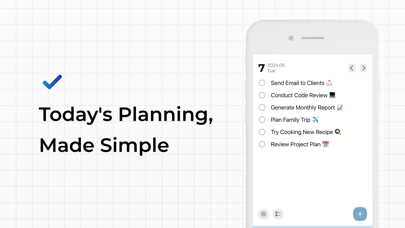
RiverTodo is a simple yet powerful daily planner designed to help you focus on today's tasks and build positive habits.
By clearing your mind and organizing your day in the morning, you can avoid the stress of piling tasks. Finish your day with the satisfaction of an empty list via our intuitive "check-off" experience, and enjoy a relaxing evening. RiverTodo turns the daily grind into a rewarding cycle of accomplishment.
【Key Features】
1. Intuitive & Simple
Add tasks instantly with the "+" button. Swipe to delete, drag to reorder. No complex menus—just a clean interface that lets you focus on doing, not organizing.
2. Focus on "Today"
Swipe lower-priority tasks to the "Pending List". Keep your daily view clean and focused strictly on what matters right now. Boost your productivity by eliminating visual clutter.
3. Visualize Your Progress
Review your completed tasks day by day. Seeing your streak of "All Done" days builds confidence and provides the motivation to keep your momentum going.
4. Home Screen Widgets
Check your progress and complete tasks directly from your Home Screen. Stay on top of your schedule at a glance without even opening the app.
5. iCloud Sync
Seamlessly sync your tasks across iPhone and iPad. Capture ideas on the go and review them at home. Your list is always up to date, wherever you are.
6. Premium Themes
Customize the app's look with a variety of beautiful color themes. Make your planner feel personal and enjoyable to use every single day.
【Recommended For】
- People who want a simple, stress-free way to manage daily tasks
- Those who want to build better daily routines and habits
- Users who want to track their productivity history
- Anyone who finds complex project management tools overwhelming
- Users who need iCloud sync across Apple devices
【Our Story】
We built RiverTodo because we were tired of complex apps that made us feel guilty about "overdue" tasks. We wanted a tool that encourages you to focus on the present. If a task isn't relevant today, move it or delete it. RiverTodo helps you flow through your day with purpose and peace of mind.
Terms of Use: https://orueri.notion.site/orueri/River-Todo-50e22166398e4a7bb3ade6b9dc705e35
Privacy Policy: https://orueri.notion.site/orueri/River-Todo-318b86ded94d4f049ca9841a8c85236d