Passwords-Manager

Passwords-Manager Summary
Passwords-Manager is a mobile iOS app in Productivity by Taha Husain. Released in Jun 2023 (2 years ago). It has 1.00 ratings with a 5.00★ (excellent) average. Based on AppGoblin estimates, it reaches roughly 6.00 monthly active users . Store metadata: updated Jan 31, 2026.
Store info: Last updated on App Store on Jan 31, 2026 .
5★
Ratings: 1.00
Screenshots




App Description
Passwords-Manager is a 100% offline password management application that enables users to store, organize, and manage their passwords, notes and other sensitive information locally on their devices without relying on cloud-based services.
Highly Secure Offline Passwords Manager Application:
This application is 100% offline without even having the internet connection in this application. It stores data only on the user's device and encrypts it using AES-256 bit encryption, ensuring high security and privacy.
Multiple Login Types:
The application offers users the flexibility to choose from three different login types: Pattern, Passwords, and Biometric.
Malicious Login Detection:
The app locks itself temporarily for a specified period of time after multiple failed login attempts, protecting against unauthorized access and brute-force attacks.
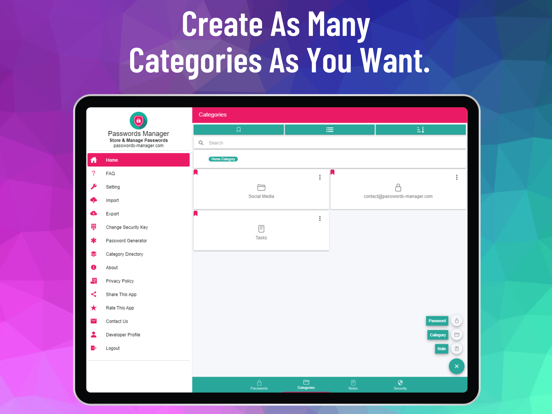
Category-wise Data Organization:
The application offers a hierarchical organization system, allowing users to categorize their data using multi-level categories. This means that users can create nested categories to structure their information effectively. Within these categories, users can store passwords, notes, and other relevant data.
Password Generator:
The application includes a Password Generator tool that assists users in creating highly secure passwords.
Weak & Repeated Passwords Alert:
To enhance password security and assist users in managing their passwords effectively, the application provides a dedicated feature that lists all repeated and weak passwords separately.
Multiple View Types:
The application incorporates a user interface (UI) and user experience (UX) feature that allows users to choose between two different views for displaying their data: tile view or list view.
Multiple Color Themes:
At present, this application provides support for two distinct color themes: "Dark" and "Light." Users have the option to choose between these two themes based on their preference and visual comfort.
Multiple Language Support:
At present, the application provides support for a wide range of languages, surpassing 14 language options.
Export Data:
Since the Passwords Manager application operates entirely offline, transferring data to a new device requires a manual export of their data from the current device and securely stores it somewhere before uninstalling the application.
File Import Data:
Passwords Ma