Device Monitor Z: CPU x RAM OS

Device Monitor Z: CPU x RAM OS Summary
Device Monitor Z: CPU x RAM OS is a free, with in-app purchases iOS app in Developer Tools by Phan Nhut. Released in Jul 2023 (3 years ago). It has 1.1K ratings with a 4.56★ (excellent) average. Based on AppGoblin estimates, it reaches roughly 3K monthly active users and generates around $<10K monthly revenue (100% IAP / 0% ads). Store last updated Mar 22, 2026
Recent activity: 5.00 new ratings this week View trends →
Device Monitor Z: CPU x RAM OS SDKs Summary
App not yet scanned for SDKs.
4.56★
Ratings: 1.1K
Screenshots


App Description
Discover the power of our app - Device Monitor Z (also known as iDevice Monitor) is an app optimized for iPhone, iPod Touch, and iPad users. It provides a quick and efficient way to access activity monitor (CPU monitor, detailed RAM, Storage space, ...) and system information of device.
- Key Features:
• View basic CPU information and real-time CPU monitor
• View basic GPU information.
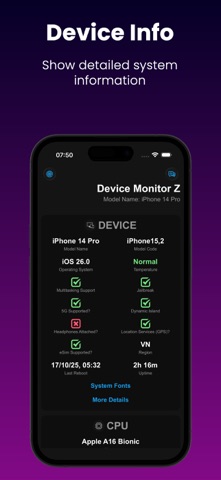
• View basic device information (System status)
• View basic OS (Operating System) information
• View basic battery information
• Check Memory & Disk (RAM & Storage) information details.
• Monitor network traffic with real-time upload and download speeds.
• Support Quick Actions to run functions quickly from Home Screen
• Access camera information.
• Access display information.
• Check supported sensors
- Support Widget to display device information such as RAM/Disk/CPU/Battery/Network info:
• iOS 14 Home Widget
• iOS 16 Lock Widget
• iOS 17 Standby Mode for Widget
- System Fonts:
→ Show all fonts available in the system
- Additional Tools:
• Performance Benchmark:
→ CPU Benchmark: Measure the computational capability of the device's CPU.
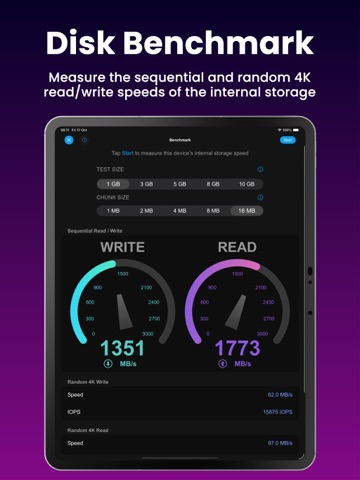
→ Disk Benchmark: Measure sequential read/write speed, random 4K read/write speed, and latency of internal storage.
• Network Analyzer (also known as Wifi Analyzer or Network Tool), including:
→ SpeedTest: Evaluate internet download speed and upload speed (powered by SpeedChecker)
→ LAN Scanner (also known as Wifi Scanner or Network Scanner): Scan devices on your local network
→ Ping tool: Measure latency to a domain/IP Address
→ Traceroute
→ Port Scanner: Verify open or closed ports on domain/IP Address
→ DNS Lookup (support DoH and DoT): Retrieve domain information
→ DNS Speed Test (support DoH and DoT): Measures and compares the query response times of various DNS servers, helping users identify and select the fastest server for enhanced network performance.
→ Bonjour Service Browser: List the Bonjour services advertised on your wireless network.
• Screen Test:
→ Perform quick screen tests
• Sensor Monitor, including:
→ GPS
→ ALTIMETER
→ ACCELEROMETER
→ MAGNETOMETER
→ GYRO
→ MOTION COPROCESSOR
→ MAGNETIC
→ GRAVITY
→ ROTATION
→ ROTATE RATE
• Toolkit:
→ Anti-Mosquito
→ Decibel Meter: Gauge ambient noise levels accurately in your surroundings.
→