PassVault: Password Keeper

PassVault: Password Keeper Summary
PassVault: Password Keeper is a free, ad-supported, with in-app purchases iOS app in Productivity by 晖明 甘. Released in Oct 2024 (2 years ago). It has 11 ratings with a 4.27★ (good) average. Based on AppGoblin estimates, it reaches roughly 65 monthly active users and generates around $<10K monthly revenue (22% IAP / 78% ads). Store last updated Jul 9, 2026
PassVault: Password Keeper SDKs Summary
App not yet scanned for SDKs.
4.27★
Ratings: 11
Screenshots




App Description
The PassVault app helps you securely and easily manage your passwords in your iPhone/iPad, with all data stored locally on your device..
Password Security
・ Account password keeper (easily create, search, and copy).
・ Password generator (support customizable length, characters, digits, case).
・ Data is locally stored and secured with AES-256 encryption and SHA salting.
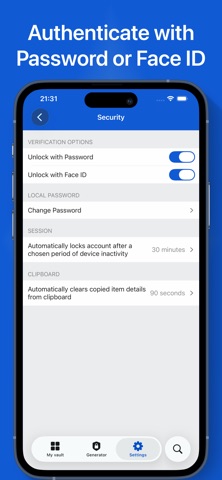
・ Authentication (including passwords and Face ID).
Efficiency and Convenience
・AutoFill Passwords (automatically fill passwords when logging in to websites and apps).
・Easily organize your passwords (categorize into folders, modify, delete, move).
・Tailor your password records with Custom Fields(support text, hidden text, date, ...).
・iCloud synchronization (multi-device data sharing).
Supports the following Record Types:
• Login & password credentials
• Secure notes
More
・We're constantly adding new features.
・Support us with a kind feedback to msoftstudio6x@gmail.com.
Subscription Information
Upon purchase confirmation, the payment will be charged to your Apple account. The subscription will automatically renew unless auto-renew is turned off or the subscription is canceled in settings at least one day (24 hours) before the subscription period ends. You can manage your subscription and turn off auto-renewal in your Apple account Settings > Account (Apple ID) > Subscriptions.
Terms of Use
https://www.apple.com/legal/internet-services/itunes/dev/stdeula
Privacy Policy
https://w8ksdhi7x5.feishu.cn/docx/NVV7dltNsoHclZx0iwAcUP1MnNh