Bitsboard Flashcards PRO

Bitsboard Flashcards PRO Summary
Bitsboard Flashcards PRO is a mobile iOS app in Education by Happy Moose Apps. Released in May 2013 (13 years ago). It has 1.1K ratings with a 4.30★ (good) average. Based on AppGoblin estimates, it reaches roughly 983 monthly active users . Store last updated Jun 1, 2026
Bitsboard Flashcards PRO SDKs Summary
App not yet scanned for SDKs.
4.3★
Ratings: 1.1K
Screenshots



App Description
A top 5 education game in the U.S.
2021 Academic Choice Awards Winner
Spark excitement for learning with Bitsboard – an interactive learning app trusted by over 5 million parents, teachers and students worldwide. Create your own learning experience with 35+ educational activities, join a private classroom or dive into thousands of hand-curated flashcard decks – whatever you want to learn, Bitsboard is here to make it fun and make it stick!
What you can do with the Bitsboard app:
Teachers
• Create lessons in minutes with beautiful images and clear audio
• Adapt lessons to an individual user’s learning speed
• Encourage higher level thinking with fun single/multiplayer mini-games
• Keep track of individual progress
• Automatically back up and sync data across devices
Students
• Turn boring assignments into addictive mini-games
• Master languages, vocab, reading, spelling and more
• Compete in multiplayer games with classmates
• Study at your own pace or with others
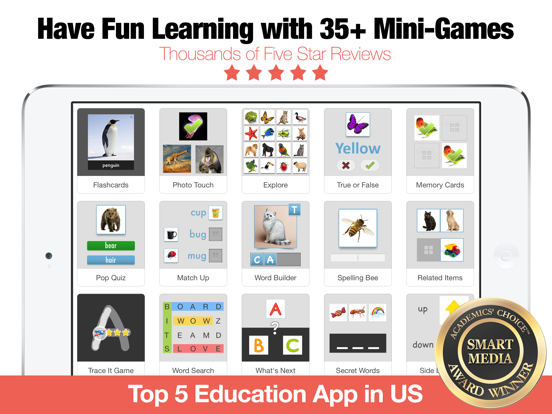
OVER 35+ POWERFUL MINI GAMES / STUDY MODES IN 1 APP INCLUDING
• Flashcards
• Photo Touch
• Memory Cards (1-4 players)
• Pop Quiz
• Match Up
• Word Builder
• Sentence Builder
• Spelling Bee
• BINGO (1-4 players)
• Letter Tracing
• Sequencing
• Related Items
• Word Search
• Crosswords
• Letter Match
• Odd One Out
• What Comes Next?
• Side by Side
• Word Chunks
• Communicator
• Reader
• Questions Game
• Photo Hunt (1-4 players)
• Racing Rivals (2 players)
• Battle Time (2 players)
• Say It Game
TRACKS YOUR PROGRESS
• Bitsboard keeps track of every answer for every game, user, and board
SUPPORTS MULTIPLE USERS
• Bitsboard makes it easy to add multiple users and switch between user accounts
• You can now instantly review the detailed progress for each user
• Automatically saves game settings at the user level
ACCESSIBILITY OPTIONS
• Bitsboard fully supports switch control to make all of the games accessible for users with disabilities
ORGANIZE YOUR BOARDS
• You can now group your boards into classes.
• Each board can fit into as many classes as you like.
• Organize your boards by class, user, subject, and more.
ACCELERATE YOUR LEARNING
• Bitsboard's learning algorithm automatically personalizes each game based on the players skills.
• Bitsboard knows your problem words and when you are ready