Router Password : WIFI Connect

Router Password : WIFI Connect Summary
Router Password : WIFI Connect is a ad-supported, with in-app purchases iOS app in Tools by xita apps. Released in Sep 2023 (2 years ago). It has 449 ratings with a 4.51★ (excellent) average. Based on AppGoblin estimates, it reaches roughly 1.5K monthly active users and generates around $<10K monthly revenue (49% IAP / 51% ads). Store last updated Feb 21, 2026
Router Password : WIFI Connect SDKs Summary
App not yet scanned for SDKs.
4.51★
Ratings: 449
Screenshots
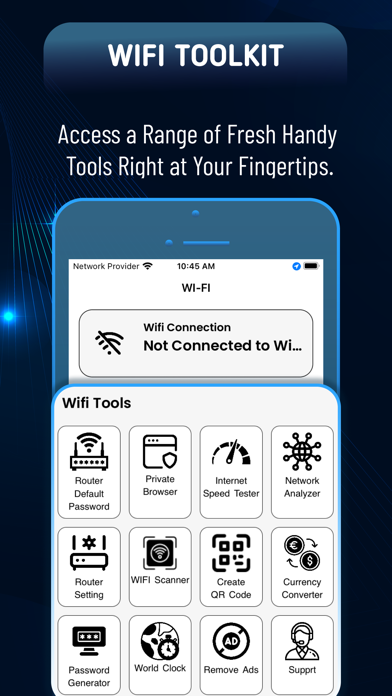


App Description
With WiFi App, you can easily discover and connect to Wi-Fi networks in your area.
Our app identifies secure hotspots that are available for public use or passwords you have already added, so you can browse the internet safely and securely and also check speed and other parameters. If you want to any Wi-Fi router then the app provides all default password data provided by the router's company with the model name and user name.
Tools and Features :
1. Router Default Password
Router Password is the best app to discover all Wifi router passwords if you want to change your Wifi settings and you don't know the admin user or password then with this app you can discover your user and password information in a second using router default password data.
2. Private Browser
COMPLETE PRIVATE BROWSING
you can view all your websites PRIVATELY and in FULL SCREEN! This is the simple, no frills web browser you've been waiting for.
3. Internet Speed Tester
Quick, easy, one-tap connection internet speed test—accurate anywhere with our global server network.
4. Network Analyzer
analyze the state of Wi-Fi networks, discover devices connected to WLAN and detect network problems.
5. Router Setting
You can do a basic configuration or access the full WEB Interface configuration to manage all your Router.
6. WIFI Scanner
simply scan a pre-generated QR code using your device camera, and you're ready to roll. Plus, with the password display feature, you can even view the network password.
7. Create QR Code
Generate, scan and connect! It can not be easier! If you are in a rush, a QR code will be generated as soon as you enter the data into the app.
( Enter your network name (SSID)
Enter your network password (if you have one)
scan from the screen or share by: email,WhatsAppp, telegram …)
!!! IMPORTANT !!!
This app is not for cracking or hacking any kind of wifi so if it happens it will simply be a coincidence.
Enjoy wifi tools app.