Shopping Lists+ Share&History

Shopping Lists+ Share&History Summary
Shopping Lists+ Share&History is a free, ad-supported iOS app in Shopping by sky-nexus Inc.. Released in Sep 2024 (2 years ago). It has 46 ratings with a 4.13★ (good) average. Based on AppGoblin estimates, it reaches roughly 192 monthly active users and generates around $<10K monthly revenue (0% IAP / 100% ads). Store last updated Sep 24, 2026
Shopping Lists+ Share&History SDKs Summary
App not yet scanned for SDKs.
4.13★
Ratings: 46
Screenshots


App Description
Shopping List+ is an app that allows you to create a shopping list for each store and share it with family members!
■■ Family sharing can be set up on a store-by-store basis. ■■
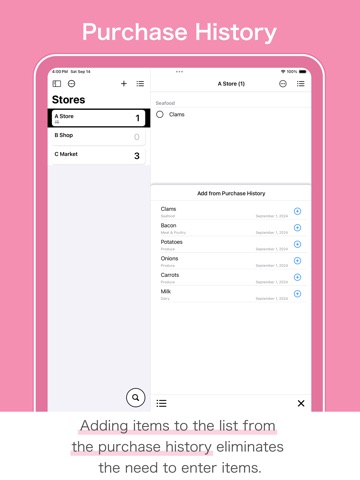
■■ Items can also be added from the purchase history. ■■
Based on feedback from moms, this app creates a list of things to buy in as few steps as possible and allows you to create and share lists by store.
■Store List
Switching between many shopping lists is done from the list of stores.
You can also rearrange the list of stores according to the day's shopping course.
■Shopping Lists
Items can now be created in succession using “Next” in the keyboard.
For items with a purchase history, items can also be added from the list of purchase history.
Items with a check mark are recorded in your purchase history by tapping the cart button.
It is also possible to delete items without recording them in the purchase history.
Each item can be assigned a category or note.
■Categories
Categories can be set for each store.
When adding items from the purchase history, the category setting is also reflected.
In the list of categories, you can also reorder or delete categories.
■Family Sharing
Family sharing can be set up for each store, so you can create shopping lists for family members and for yourself.
Data is reflected in real time, so you can split up your shopping.
Whether or not family sharing is set up can be checked by using the icon below the store name. (List of stores)
*Time lag may occur depending on the communication environment.
*Available on iPhone and iPad.
*All devices must be configured for iCloud because of the use of iCloud.
*Please make sure you have enough storage space in iCloud.
*Store data shared with family members will be stored in the owner's iCloud storage.
■Search function
The search function allows you to find items from all your store shopping lists and purchase histories.
If the desired item is not found in the search results, the item can be added to the shopping list from that screen.
Also, items can be added from the purchase history displayed as search results by tapping the Add button.
This search function is available from the search button on the store list.
■Other Functions
- Dark mode supported.
- Multi-device support.
- All data is stored on the device or in iCloud to help protect privacy.
- Data stored on the device i