MediBang Paletta:Drawing App

MediBang Paletta:Drawing App Summary
MediBang Paletta:Drawing App is a ad-supported, with in-app purchases iOS app in Art And Design by MediBang inc.. Released in Jan 2024 (2 years ago). It has 5.1K ratings with a 4.50★ (excellent) average. Based on AppGoblin estimates, it reaches roughly 16.1K monthly active users and generates around $<10K monthly revenue (41% IAP / 59% ads). Store last updated Jun 30, 2026
MediBang Paletta:Drawing App SDKs Summary
App not yet scanned for SDKs.
4.5★
Ratings: 5.1K
Screenshots
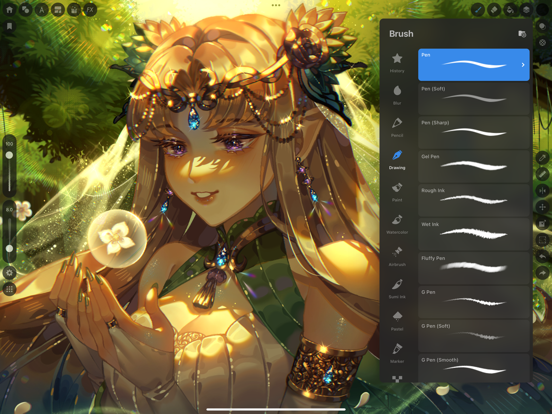
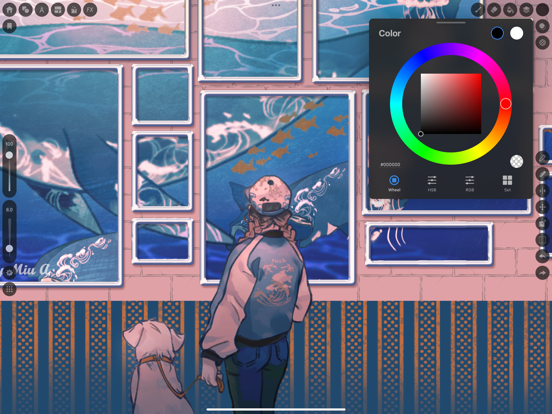
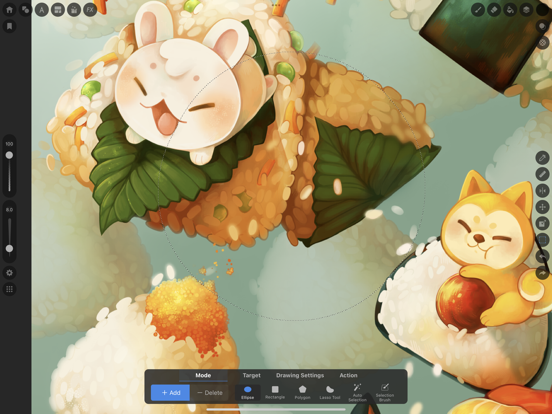
App Description
No intrusive ads to interrupt your flow.
Free for 2 hours daily, with unlimited use afterward by watching ads. Prefer to buy? Get a lifetime license with a one-time purchase.
Draw for yourself, in your time, by you like.
MediBang Paletta is the painting app for you.
We made this for you.
The latest work in the MediBang Paint series, which boasts 100 million downloads.
This is a new proposal from MediBang.
The app's beautiful canvas is waiting for you to create art. Today, try MediBang Paletta and watch your improvement skyrocket!
Crafted by the minds behind MediBang Paint, MediBang Paletta gives you a perfectly designed experience to reach creative heights never thought possible, no subscription required.
Key Highlights:
・User-Friendly Interface: Work effortlessly with an intuitive interface.
・World-Class Brushes: Enjoy meticulously crafted brushes for the iPad experience.
・Auto-Save: Never worry about losing a sketch again.
・Nuanced Layering: Exercise precise control over your art.
Your Perfect Brushes
・Customizable Default Brushes: Tailor any default brushes to match your style.
・Stabilization Tool: Create your smoothest lines ever.
・Creative Effects: Add intricate details with cool effect and stamp brushes.
・Pen Pressure Settings: Responsive and adjustable settings to suit you.
・Unique Brushes: Explore dozens of brushes designed exclusively for MediBang Paletta's brush engine.
Effortless Layers and Colors
・Clipping Masks: Edit without compromising your initial art.
・Layer Groups: Keep your work neat and tidy.
・Blending Modes: Nearly 20 blending modes to adjust your art as you desire.
Professional Finishing Touches
・Artistic Filters: Add captivating effects to give your work a professional look.
・Blur Tool: Achieve softness, movement, and depth.
・Easy Edits: Refine your work's proportions using the Transformation Tool.
Intuitive and Lightweight
・Artist-First Design: Enjoy an app designed with giving you the best artistic experience in mind.
・Simplicity is Key: Focus on your creativity with a simple, lightweight interface that transforms your screen into a studio.
・Efficient Storage: Save your work in MediBang Paletta export it to the Files app.
・No Lag: Bid farewell to brush lag and slow loading times forever.
Share Your Masterpieces
・Pro Export: Import or export your art in various formats, including Adobe