Weather Events - for Calendar
Weather Events - for Calendar Summary
Weather Events - for Calendar is a with in-app purchases iOS app in Weather by Dejal Systems, LLC. Released in Jul 2024 (1 year ago). It has 6.00 ratings with a 3.16★ (mixed) average. Based on AppGoblin estimates, it reaches roughly 19 monthly active users and generates around $<10K monthly revenue (100% IAP / 0% ads). Store metadata: updated May 21, 2026, version 1013.
Data tracking: SDKs and third-party integrations were last analyzed on May 24, 2026.
Store info: Last updated on App Store on May 21, 2026 (version 1013).
SDKs, Trackers & Permissions
Weather Events - for Calendar was last scanned for SDKs 2026-05-24. Below is the overview of third party companies detected in the app. The full list of raw SDKs, app permissions and unknown SDKs is available here.
AppGoblin saw Weather Events - for Calendar uses 1 Business Tools
 RevenueCat
App Details
App Store
Ads & App-Ads.txt
AppGoblin SDK Scans
3.16★
Ratings: 6.00
Screenshots




App Description
Ever tried to remember what the weather was like a month ago? A year ago? During your last vacation?
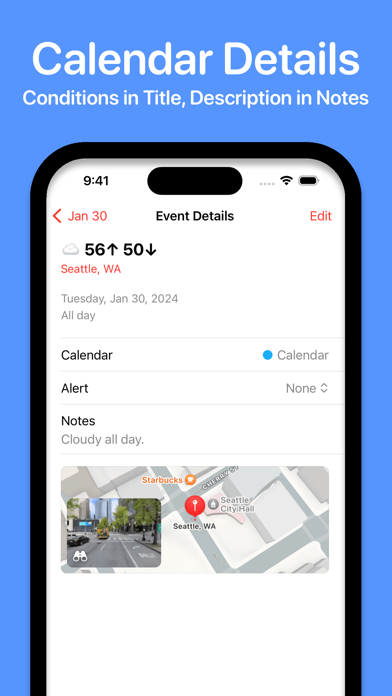
Weather Events saves a record of the weather conditions to your calendar, so you can look back at previous weeks, months, and years, and see what the weather was like back then.
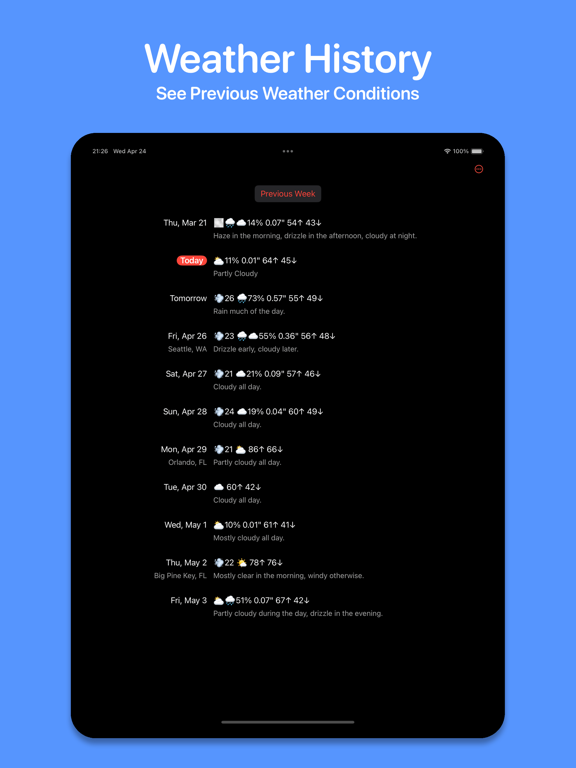
The app displays a list of days and the weather for each, using emojis and high/low temperature display, and a textual description, which is saved in the event note.
Weather Events respects your privacy. It doesn't request access to track your location, but just asks you to choose a location for the forecast. And it doesn't use any third-party trackers or send any data to anyone, other than Apple's weather service.
Another key feature is that each day can have a different location; great if you travel a lot. By default it uses a single location, but you can choose a different location for each day, and they are displayed in the event if desired.
Tap on a day in the app to choose whether to use the forecast or custom values, whether or not to show the location in the event, and choose a new or previous location.
The weather conditions can use multiple emojis to show how the weather changes throughout the day, e.g. sunny in the morning and rainy in the evening. If there's rain, the probability percentage and quantity is included. And if it's breezy, the maximum wind gust is also included. The precipitation and wind can be disabled in the settings if you prefer.
If the forecast doesn't exactly match what you experience, or you want to make a note of anything special, you can easily edit the event in the app.
The weather events and settings are synced between multiple devices via iCloud.
Weather Events requires a subscription to cover costs, available on a monthly or yearly basis, with a free two week trial before you are charged. Apple will charge your Apple ID account, and the subscription automatically renews unless it is cancelled before the end of the current period. You can manage the subscription via the button in the Settings window, or going to your App Store account settings.
Terms of Use: https://www.apple.com/legal/internet-services/itunes/dev/stdeula/
Privacy Policy: https://dejal.com/about/privacy/
Dejal is a one-person indie app developer, and has a reputation for prompt and friendly support. Use the Contact Dejal menu item in the app, or check out the Weather Ev