MockApp Wireframe UI Mockup

MockApp Wireframe UI Mockup Summary
MockApp Wireframe UI Mockup is a free, with in-app purchases iOS app in Developer Tools by Tana IntelSoft SRL. Released in Dec 2024 (1 year ago). It has 50 ratings with a 4.56★ (excellent) average. Based on AppGoblin estimates, it reaches roughly 281 monthly active users and generates around $<10K monthly revenue (100% IAP / 0% ads). Store last updated Aug 18, 2026
Recent activity: 2.00 new ratings this week View trends →
MockApp Wireframe UI Mockup SDKs Summary
App not yet scanned for SDKs.
4.56★
Ratings: 50
Screenshots



App Description
The all-in-one design toolkit for Mac, iPad, and iPhone
MockApp is the fastest way to turn ideas into visuals: app screens, websites, wireframes, marketing pages, and documents. Drop ready-made components onto an infinite board, arrange them your way, and export crisp, print-ready PDFs. Every board lives in iCloud and follows you across Mac, iPad, and iPhone.
KEY FEATURES
• Infinite boards — one home for every idea: app flows, landing pages, moodboards, reports, and more, side by side on a single canvas.
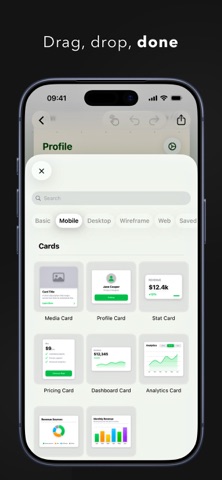
• 200+ ready-made components — mobile cells, cards, lists, tab bars, desktop windows and controls, web sections, and wireframe blocks. Drag, drop, done.
• Every platform on one board — sketch a wireframe, refine the mobile screen, and design the matching website without switching tools.
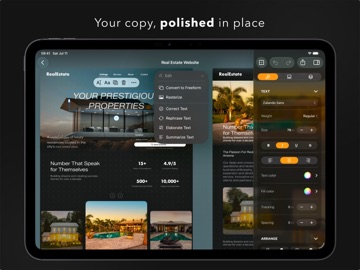
• Real typography — full font, weight, spacing, and color control for text that looks like the real thing, not a placeholder.
• Smart guides & measurements — snapping, alignment guides, and pixel distances as you move things around.
• Device frames — present your work in phone, tablet, laptop, desktop, and watch frames.
• Apple Pencil drawing — sketch and annotate naturally, right next to your mockups.
• Layers & precise control — select, lock, reorder, and fine-tune every element.
• Crisp vector PDF export — even huge boards export clean, sharp, and print-ready.
• iCloud sync — start on the Mac, tweak on the iPad, show it from your iPhone.
Free to start with all Basic shapes, icons, text, and drawing tools. Upgrade to Pro to unlock the full component library and device frames.
Whether you're a designer, a developer, a founder pitching an idea, or a student sketching your first app, MockApp keeps the whole process in one place — from the first rough wireframe to the PDF you send out.
Terms of Use:
https://mockapp.studio/terms/