Image Playground

Image Playground Summary
Image Playground is a free iOS app in Art And Design by Apple. Released in Oct 2024 (1 year ago). It has 9K ratings with a 2.56★ (poor) average. Based on AppGoblin estimates, it reaches roughly 31K monthly active users . Store last updated Sep 14, 2026
Recent activity: 34 new ratings this week View trends →
Image Playground SDKs Summary
App not yet scanned for SDKs.
2.56★
Ratings: 9K
Screenshots


App Description
Bring Your Ideas to Life
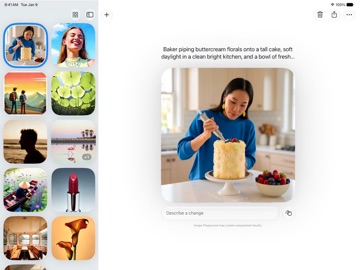
With Image Playground, you can create high-quality images in pretty much any style. Whether you’re making a photorealistic nature scene, a fun image of your friends, or a stylized version of a familiar photo, you can get started using simple text descriptions, photos, and people from your Photos library. Then choose the style you want, or select ‘Any Style’ to describe how you want it to look. And Image Playground is designed with your privacy in mind, with models that run on Private Cloud Compute, so your photos are never stored or shared, even with Apple.
Modify Images with Ease
You can easily iterate on your images, so you can make just the image you want. Simply describe the changes you want to make to update the scene and characters—like transforming the background, changing the style, or adding something entirely new. You can also refine specific parts of your image by tapping or circling an object to move it, resize it, or swap it out. Every version of your image is saved, so you don’t need to worry about losing something along the way.
Integrated Across Your Apps
Image Playground is integrated seamlessly across the apps you use every day. In Messages, you can make a fun image to send to a friend or create a custom background for your conversation. You can craft the perfect contact poster for your friends and family, or generate completely original Lock Screen wallpapers directly in Settings. Bring your presentations, mood boards, and documents to life with images in apps like Keynote, Freeform, and Pages, or design invitation backgrounds in the Invites app. And with the ability to choose your aspect ratio, you can use images wherever you need them—like a landscape image for your small business’s website or a portrait image for your flyer.
Image Playground is available in the following languages: Danish, Dutch, English, French, German, Italian, Japanese, Korean, Norwegian, Portuguese, Simplified Chinese, Spanish, Swedish, Traditional Chinese, Turkish, Vietnamese.