PhotoMark: Photo Frame & EXIF

PhotoMark: Photo Frame & EXIF Summary
PhotoMark: Photo Frame & EXIF is a free, with in-app purchases iOS app in Photo And Video by 慧鑫 贾. Released in May 2024 (2 years ago). It has 11 ratings with a 4.09★ (good) average. Based on AppGoblin estimates, it reaches roughly 6.00 monthly active users and generates around $<10K monthly revenue (100% IAP / 0% ads). Store last updated Sep 18, 2026
PhotoMark: Photo Frame & EXIF SDKs Summary
App not yet scanned for SDKs.
4.09★
Ratings: 11
Screenshots





App Description
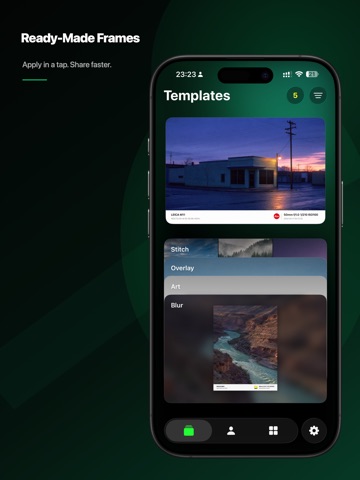
PhotoMark is a photo-frame and EXIF watermark app built for photographers. Import a photo to read camera, lens, aperture, shutter speed, ISO, focal length, and capture time, then match its camera-brand logo automatically. Flexible controls provide over one million possible frame combinations.
Six creative modes
- Classic Frame: Arrange EXIF data, brand logos, and custom text in a professional frame.
- Blur Frame: Build a soft backdrop from the photo itself and keep the subject in focus.
- Art Frame: Adjust aspect ratio, margins, and background colors freely.
- Inline Frame: Choose from nine positions and combine icons, custom text, and EXIF data.
- Cinema Frame: Arrange 2–5 photos horizontally or vertically, then adjust order, crop, spacing, outer margins, and background color.
- Instant Frame: Recreate 28 Bowie, Basquiat, and MoMA artist papers with classic, round-window, and wide formats, film effects with adjustable strength, and direct drag-and-pinch framing.
Built for photography workflows
- Match camera-brand logos automatically, with 20+ built-in brand groups plus custom icons and matching rules.
- Choose from multiple information layouts and configure camera, lens, and shooting data.
- Import up to 18 photos for individual editing, or apply the current settings to all.
- Pro Lightning mode exports up to 36 photos in a batch.
- Save reusable setups to My Frames and sync them across devices with iCloud.
- Export in 1080p, 2K, 4K, 5K, or 8K.
- Optionally preserve the original photo metadata.
Whether you want to document shooting settings, keep a consistent visual style, create camera watermarks, or arrange a travel and everyday photo series, PhotoMark turns repeated adjustments into a reusable workflow.
Some exports and advanced batch features require PhotoMark Pro.
Need help? Contact us through App Support on the App Store.
Terms of Use: https://www.apple.com/legal/internet-services/itunes/dev/stdeula/