FrameWork Pro - Screenshot

FrameWork Pro - Screenshot Summary
FrameWork Pro - Screenshot is a free, with in-app purchases iOS app in Tools by 乐彬 梅. Released in Jun 2024 (2 years ago). Store last updated Mar 17, 2026
FrameWork Pro - Screenshot SDKs Summary
App not yet scanned for SDKs.
0★
Ratings: 0
Screenshots



App Description
[Introduction]
A more flexible, more editing freedom with mockup screenshot tool, quickly create App preview images, can be used for advertising and marketing, upload to App Store, create illustrations and so on.
What you see is what you get. Each item can be freely edited to create a preview image that meets your needs.
The interface is simple, and the toolbar at the bottom can be scroll left and right.
[Functions]
Canvas size can be set freely, similar to Photoshop. Other settings can be viewed in the Backdrop Settings panel.
Mockup position can be dragged with one finger, and the size can be scaled with two fingers. Up to 3 mockups can be added. Other settings can be viewed in the Mockup Settings panel.
Text position can also be dragged with one finger. There is no limit to the number of texts that can be added. Other settings can be viewed in the Text Settings panel.
Decoration position can also be dragged with one finger, resized with two fingers, and rotated to any angle with two fingers. There is no limit to the number of decorations can be added. Some decorations support color customization. More settings can be found in the Decoration Settings panel.
The display hierarchy of canvas, mockup, text and decoration layers can be modified in the Layers panel.
Support to add up to 10 workspaces, each workspace is edited separately.
You can save the content of the workspace as a template, or select one from the template to overwrite the current workspace content, which is convenient for making uniform style pictures.
Templates support setting names, easy to remember and use.
Support auto-save workspace content, not afraid of the loss of completed work.
Support to add watermark, watermark text can by modify, support for 9 positions.
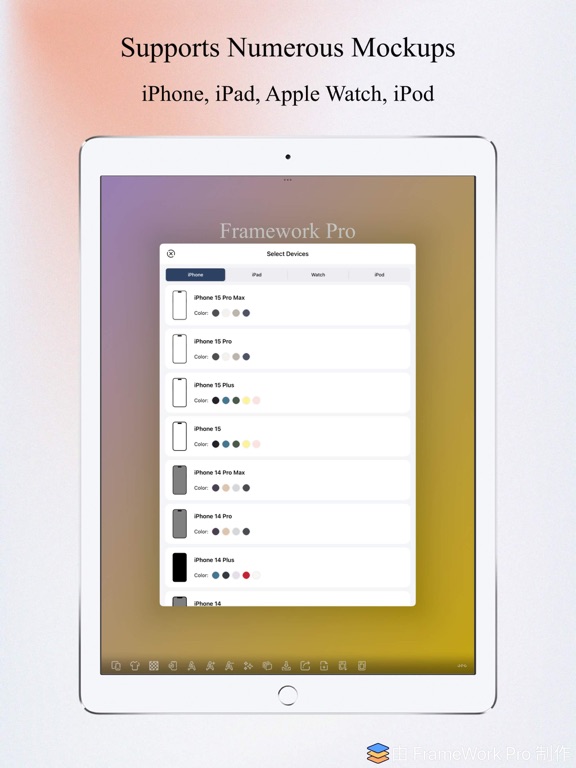
[Supported Device Mockups]
iPhone: iPhone 5 and later
iPad: iPad 5th, iPad 9th, iPad mini 6th, iPad Air 5th, iPad Air M2, iPad Pro 10.5, iPad Pro 12.9 2th, iPad Pro 11 3th, iPad Pro 12.9 5th, iPad Pro M4
Apple Watch: Series 3, Series 4, Series 6, Series 7, Series 8, Series 9, Series 10, Ultra, Ultra 2
iPod Touch: iPod Touch 6th
[Explanation]
If you want to get started quickly, please click the "More" button at the bottom, and then click "Use Tips" to see how to use each function.
You can also directly visit: https://app.meilb.com/framework-pro/use-tips.html
If you have any questions, send me an email and I wi