Evervideo: Player All Format

Evervideo: Player All Format Summary
Evervideo: Player All Format is a free, with in-app purchases iOS app in Photo And Video by EVERAPPZ SL. Released in Apr 2025 (1 year ago). It has 241 ratings with a 4.39★ (good) average. Based on AppGoblin estimates, it reaches roughly 291 monthly active users and generates around $<10K monthly revenue (100% IAP / 0% ads). Store last updated Jul 22, 2026
Recent activity: 3.00 new ratings this week View trends →
Evervideo: Player All Format SDKs Summary
App not yet scanned for SDKs.
4.39★
Ratings: 241
Screenshots




App Description
Evervideo is an all-format video player for iPhone and iPad. Play MKV, MP4, AVI, MOV, FLAC, MP3, and every major media format — no file conversion required. Watch offline, stream from cloud storage, or connect to your home computer, NAS, or media server.
Built for students, travelers, movie enthusiasts, and anyone who needs a reliable media player that works with everything.
● PLAY ALL VIDEO AND AUDIO FORMATS
Watch your media without converting files. Supports MKV, AVI, MP4, MOV, WMV, FLV, FLAC, MP3, AAC, OGG, WAV, and many more.
● OFFLINE VIDEO PLAYER
Download videos, albums, and playlists to watch without an internet connection. Take your entire video collection anywhere.
● 360° VIDEO AND VR MODE
Watch 360° and VR videos in an immersive way. Move your phone to look in any direction, or use a VR headset to feel like you are inside the video.
● PICTURE-IN-PICTURE
Keep watching videos in a small floating window while using other apps. Full playback controls and subtitles included — perfect for multitasking.
● SUBTITLES SUPPORT
Use embedded subtitles or load external subtitle files from your device or cloud storage. Adjust subtitle font size for comfortable reading on any screen. Subtitles also display in Picture-in-Picture mode, so you never miss a line while multitasking. Supports the most popular subtitle formats: SRT, VTT, SSA, ASS, SUB, JSS, and more.
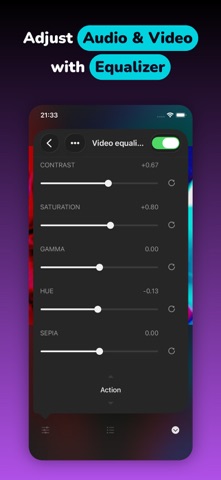
● VIDEO AND AUDIO EQUALIZER
Customize how your videos look and sound. Adjust bass, pitch, brightness, gamma, saturation, and contrast. Choose from 50+ video presets and 20+ audio presets, or create your own.
● STREAM DIRECTLY FROM CLOUD
Watch videos directly from your cloud storage without using device space. Supports iCloud Drive, Google Drive, Dropbox, OneDrive, pCloud, and more. Also supports privacy-focused services like Internxt, MEGA, and Proton Drive.
● CONNECT COMPUTER OR NAS
Easily connect your NAS, Mac, or PC over your home network using SMB, WebDAV, DLNA, FTP, SFTP, or NFS. Remote access supported for Synology Drive and WD MyCloud Home. Transfer media files to your device via Wi-Fi or iTunes File Sharing.
● CONNECT MEDIA SERVER
Connect to your personal Plex, Subsonic, Navidrome, Jellyfin, or Emby servers and play videos directly from there.
● ADVANCED MEDIA LIBRARY
Organize videos by album, genre, or duration. Automatically syncs with cloud changes. Create, ed