Data Display

Data Display Summary
Data Display is a free iOS app in Tools by masaki individual. Released in Apr 2026 (5 months ago). Store last updated Sep 10, 2026
Data Display SDKs Summary
App not yet scanned for SDKs.
0★
Ratings: 0
Screenshots



App Description
Data Display
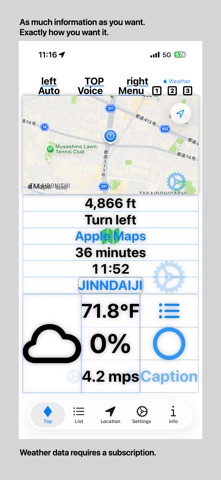
Organize and view all kinds of data from your iPhone or iPad at a glance!
The core features are free to use, and with a subscription or an Apple Music account, you can also display weather and music information directly on the screen.
Key Features
• Create multiple screens and switch between them with a simple tap
• Automatically adjusts the display for portrait and landscape orientations
• Show or hide items on each screen for a personalized layout
• Sensor and location data are regularly updated to provide the latest information
• Quickly switch screens to access the data you need
• Weather information is available with an in-app subscription
• Music information requires an active Apple Music subscription
Basic Usage
• Tap the “List” tab
• Tap the “+” button to add a new item, or tap an existing item to edit
• Set the name and icon on the item’s detail screen
• Choose the number of rows and columns to display on “Main1–3” screens
• Select which items to show from the category list and turn off the ones you don’t want
• Changes are automatically saved when you return to the main screen
Main Data You Can Display
• System Information: Battery level, date/time, display mode (Light/Dark/Auto), device orientation, voice guidance, network status, brightness, memory usage, etc.
• Location Information: Latitude/longitude, speed, altitude, heading, reverse geocoding, GPS elapsed time, graph display, etc.
• Weather Information (subscription required): Temperature, humidity, rainfall, sunrise/sunset times, forecast, wind speed/direction, sunlight level, etc.
• Route Guidance: Multiple destinations, estimated arrival times, route selection, highways/toll roads, Apple Maps integration, voice guidance, etc.
• Map Display: Current or custom location maps, standard/satellite/hybrid views, zoom, north-fixed orientation, route target display, etc.
• Music Information (Apple Music required): Title, album, artist, playback status, cover art, play/pause/skip controls, shuffle registration from recently added Apple Music tracks, etc.
Recommended For
• Users who want to organize all their iPhone/iPad data on a single screen
• Users who need to view multiple types of data simultaneously
• Users who want a fully customizable information display
• Users who want to combine weather or music information with