Notepad ++

Notepad ++ Summary
Notepad ++ is a free, ad-supported, with in-app purchases iOS app in Productivity by Kalpesh Donga. Released in Dec 2024 (1 year ago). It has 125 ratings with a 1.20★ (poor) average. Based on AppGoblin estimates, it reaches roughly 434 monthly active users and generates around $<10K monthly revenue (52% IAP / 48% ads). Store last updated Sep 17, 2026
Recent activity: 1.00 new ratings this week View trends →
Notepad ++ SDKs Summary
App not yet scanned for SDKs.
1.2★
Ratings: 125
Screenshots




App Description
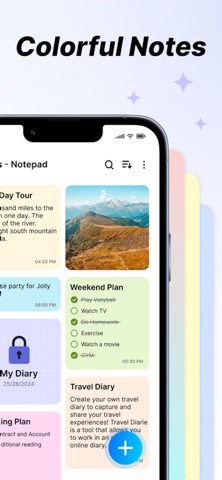
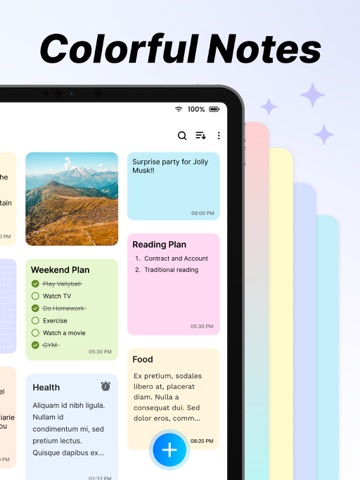
The Notes App is a handy and easy-to-use tool for taking notes, planning tasks, and organising information. It offers flexible features and customisation to fit your needs.
Key Features
1. Create Notes:
* Effortlessly create new notes with a clean and intuitive interface, perfect for jotting down thoughts, to-dos, or key information.
* Enjoy unlimited note creation with advanced formatting options, including:
* Bold, italic, and underlined text for emphasis.
* Bullet points and numbered lists for structured content.
* Easy editing tools to refine and update your notes anytime.
2. Add Images:
* Enhance your notes by attaching images directly from your device. Perfect for adding visual context, storing memorable moments, or including reference materials.
3. Font Customisation:
* Personalise your notes with adjustable text sizes and a variety of font styles. Whether you need a professional look or a casual vibe, there’s a style for every need.
4. Text Alignment:
* Organise your notes with precision by aligning text to the left, center, or right. Ideal for creating lists, structuring titles, or highlighting key sections.
5. Insert Clickable Links:
* Integrate hyperlinks within your notes for seamless navigation to websites, documents, or other online resources. Simplify accessing external content with just a tap.
6. Reminders and Notifications:
* Never miss a deadline or important task. Set reminders for specific notes and receive timely notifications to keep you on track.
7. Favourite Notes:
* Pin your most critical or frequently accessed notes as favourites. Access them instantly without scrolling through your entire collection.
8. Sorting Notes:
Keep your notes neatly organised with these sorting features:
* By Colour: Use customisable note colours to visually categorise and group related information.
* By Date: Sort notes by creation or last modification dates in ascending or descending order for chronological clarity.
9. Private Notes:
* Safeguard sensitive or personal information by marking notes as private. Secure them with a password or PIN for added peace of mind.
10. Search Functionality:
* Locate notes quickly with a robust search feature. Use keywords, tags, or filters to narrow down your search and save time.
Subscription Details:-
- Payment will be charged to iTunes Account at confirmation of purchase.
- Subscription a