Screens for Organizations

Screens for Organizations Summary
Screens for Organizations is a mobile iOS app in Tools by Edovia Inc.. Released in Oct 2024 (1 year ago). It has 1.00 ratings with a 5.00★ (excellent) average. Based on AppGoblin estimates, it reaches roughly 2.00 monthly active users . Store last updated Jul 6, 2026
Screens for Organizations SDKs Summary
App not yet scanned for SDKs.
5★
Ratings: 1.00
Screenshots




App Description
Screens for Organizations: Remote Computer Control for Schools and Businesses
Control your Mac, Windows PC, Linux PC, or Raspberry Pi effortlessly from any location—be it a classroom, office, or even across the globe. Screens for Organizations is your dependable remote desktop solution, designed for institutions that value speed, security, and reliability, offering seamless control over multiple devices.
With Screens for Organizations, remote access is at your fingertips, tailored for educational and business environments. Here’s why it’s the ideal choice for your organization:
Connect from Anywhere
Install Screens Connect on your Mac or Windows PC to gain remote access from anywhere. Your computers are now within reach wherever you are. Screens for Organizations fully integrates with Tailscale, making remote connections to Linux PCs and Raspberry Pi devices seamless.
Curtain Mode
Maintain privacy during sessions with Curtain Mode, which masks the remote Mac’s display. Ideal for classrooms and shared workspaces, this feature keeps your activity discreet.
Secure Connections
Screens provides secure access to your computers. Enable Remote Login on your Mac or configure SSH for Windows, Linux, or Raspberry Pi. For enhanced security, Screens also supports SSH key authentication.
Effortless Login
With automated password entry, connecting to your remote computer is fast and hassle-free. Save time with a seamless login experience.
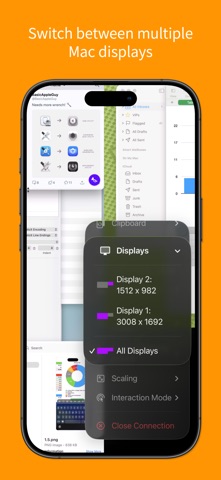
Display Selection
Choose the display you want on multi-screen Macs or show them all. Screens remembers your choice for each session.
Clipboard Sharing
Synchronize text, URLs, images, and more between local and remote clipboards. Keep everything in sync without interruption.
Session Selection
When someone is using a remote Mac, Screens allows you to either share their session or start a new one, giving you control over access.
Raspberry Pi 5 Compatibility
Screens supports Bookworm and WayVNC with RSA-AES authentication, ensuring fast, reliable performance.
Shortcuts Toolbar
Boost productivity with easy access to your favorite shortcuts through a scrollable toolbar.
External Input Devices Support
Use your Magic Keyboard or any compatible external keyboard and pointing device for a seamless, intuitive control experience.
Easy to Use
Screens for Organizations offers familiar, intuitive controls, ensuring a consi