Photos to PDF Document

Photos to PDF Document Summary
Photos to PDF Document is a free, with in-app purchases iOS app in Business by Andrii Cherniakhov. Released in Oct 2024 (1 year ago). Store last updated Jan 23, 2025
Photos to PDF Document SDKs Summary
App not yet scanned for SDKs.
0★
Ratings: 0
Screenshots




App Description
PDF Photos - Photos to PDF is your go-to solution for converting images to PDF format on your iOS device. Whether you need to turn a PNG to PDF, JPG to PDF, or any other image format, our app has you covered with powerful customization options.
Key Features:
• Quick conversion: Transform photos to PDF in just a few taps
• Multiple format support: Works with PNG, JPG, and other common image formats
• Batch processing: Convert multiple images to a single PDF document
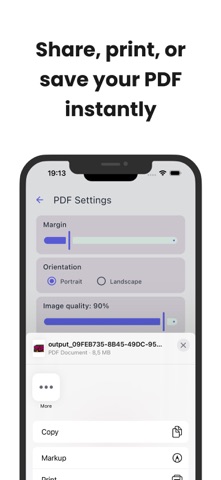
• Customizable settings: Adjust margins, orientation, and image quality
• Preview function: See your changes in real-time before creating the PDF
• High-quality output: Maintain image clarity with adjustable quality settings
• User-friendly interface: Easy to navigate, even for first-time users
• No internet required: Convert your photos offline for added privacy
Advanced Options:
• Margin control: Fine-tune the white space around your images
• Orientation selection: Choose between portrait and landscape layouts
• Image quality adjustment: Optimize file size without sacrificing visuals
Perfect for:
• Students submitting assignments
• Professionals sharing work documents
• Photographers creating portfolios
• Anyone needing to create customized PDFs from images on-the-go
Say goodbye to complicated conversion processes. With PDF Photos, turning your images into polished, professional-looking PDF documents has never been easier or more customizable.
Download now and experience the perfect blend of simplicity and advanced features in your image-to-PDF workflow!
Privacy Policy: https://anch-tech.com/privacy-policy
Terms of Use: https://www.apple.com/legal/internet-services/itunes/dev/stdeula