Document Scanner, Scan to PDF

Document Scanner, Scan to PDF Summary
Document Scanner, Scan to PDF is a free, with in-app purchases iOS app in Business by CREATIVE TECHNOLOGIES LLC. Released in Dec 2024 (1 year ago). It has 868 ratings with a 4.70★ (excellent) average. Based on AppGoblin estimates, it reaches roughly 4K monthly active users and generates around $<10K monthly revenue (100% IAP / 0% ads). Store last updated Oct 18, 2026
Recent activity: 1.00 new ratings this week View trends →
SDK intelligence: AppGoblin detected 2 analytics: product(e.g. Amplitude), 1 analytics: attribution,and 1 development tools integrated into Document Scanner, Scan to PDF. View full SDK list →
Document Scanner, Scan to PDF SDKs Summary
Document Scanner, Scan to PDF was last scanned for SDKs on 2026-08-25. Below is the overview of third-party companies detected in the app. The full list of SDKs, permissions and unknowns is available here.
 Amplitude
 AppHud
 AppMetrica
 Alamofire
4.7★
Ratings: 868
Screenshots


App Description
Scanning documents has never been easier! Turn your smartphone into a portable scanner and manage your documents effortlessly.
Need to scan and share a document quickly? With the Scanner app, you can digitize documents in just a few taps and keep your paperwork organized.
SCAN INSTANTLY
Start by tapping the "Scan Document" button. Take a new photo, choose one from your photo gallery, or select a file directly from your device. Scanner adapts to your needs with flexibility for any type of document.
EASILY ADD SIGNATURES
Create and save digital signatures for future use.
Choose the color of your signature and adjust its size to fit perfectly in the document. Add your signature to any page with precise placement.
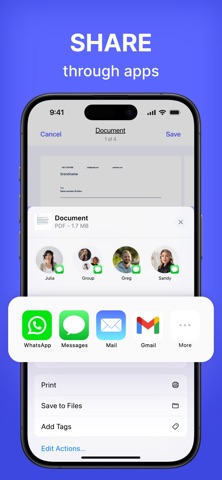
EXPORT AND SHARE
Export documents in JPG or PDF format and share them effortlessly. Use the built-in sharing menu to quickly send files via email, messengers, cloud storage, and more.
ENHANCE YOUR SCANS
Cropping and adjustments: Manually select and adjust the document's edges for perfect borders.
Retake or save: Not satisfied with the result? Retake or save the scan for later.
ORGANIZE YOUR DOCUMENTS
Easily view all pages of a scanned document and switch between them. Rename documents, add pages, rotate, or crop as needed. Delete unnecessary pages or entire documents with a single tap.
Terms of Service: https://calledandrey.github.io/scannerapp/terms.html
Privacy Policy: https://calledandrey.github.io/scannerapp/privacy.html
Got questions or suggestions? Email us at scannerappnet@gmail.com.
We’d love to hear your feedback!