PDF Editor, Edit PDF Documents

PDF Editor, Edit PDF Documents Summary
PDF Editor, Edit PDF Documents is a free, with in-app purchases iOS app in Business by Dzine Media. Released in Feb 2025 (1 year ago). It has 27 ratings with a 4.36★ (good) average. Based on AppGoblin estimates, it reaches roughly 114 monthly active users and generates around $<10K monthly revenue (100% IAP / 0% ads). Store last updated Jan 8, 2026
PDF Editor, Edit PDF Documents SDKs Summary
App not yet scanned for SDKs.
4.36★
Ratings: 27
Screenshots




App Description
Change the way you manage your PDFs on your iPhone and iPad with our PDF Editor.
This is a powerful and innovative application designed and programmed to handle all your PDF management needs.
Whether you’re a student handling academic notes, a business professional viewing posters/brochures, or a casual user having tons of PDF photos, our editor app provides plenty of features that’ll help you view, edit, sign, annotate, and even share your PDFs without putting much effort.
USPs of PDF Editor and Reader
View and Read PDF Docs
Our app allows you to open and read PDF files no matter what the size. You can customize your viewing experience by changing the layout or you can simply zoom in or out for better readability.
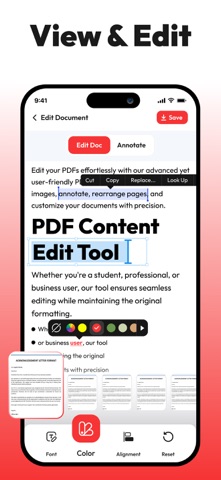
Edit PDF Text
Users can easily modify text in the PDF document. Our app allows you to change font size, style, colors, and alignment, and make other amends. You can make quick corrections on your iPhone without requiring premium software or a desktop.
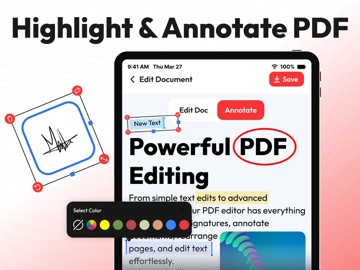
Annotate PDFs
With this PDF editor, you can easily add comments to the document, highlight text, underline sentences, and even add notes to your PDFs. The drawing tool allows users to add annotations and customize colors for markups.
E-Signatures
You can also fill out PDF forms quickly without changing the format or use the signature feature to add your e-signature to documents. You can create, save, and reuse your signature without any hassle.
Organize Pages
The PDF editor app allows you to rearrange, delete, rotate, or extract pages from your documents in a matter of seconds. You can also merge multiple PDFs into one, or split a large file into smaller, more manageable parts.
Document Security
Users can keep documents safe and secure by setting passwords or applying other encryption options. You can control who can access your PDF content and can restrict unauthorized editing or copying of content.
Cloud Integration
Sync in the PDF editor with popular cloud services such as iCloud, Dropbox, Google Drive, and OneDrive to access your PDFs across all your devices. Edit and save directly to your preferred storage space.
Export and Share
You can save your edited PDFs in various formats, including PDF, JPG/PNG, and Word documents. The app also allows you to share your documents via email, messaging apps, or directly to iCloud storage.
Why Choose this PDF Editor?
• PDF editor