Notes Notepad

Notes Notepad Summary
Notes Notepad is a free iOS app in Productivity by Jksol Infotech LLP. Released in Dec 2024 (1 year ago). Store last updated Dec 18, 2024
Notes Notepad SDKs Summary
App not yet scanned for SDKs.
0★
Ratings: 0
Screenshots


App Description
The Notes App is an all-in-one productivity tool designed to help users capture their thoughts, manage tasks, and stay organised with ease. With a variety of features aimed at enhancing productivity, this app is perfect for anyone looking to stay on top of their personal or professional tasks.
Key Features: -
1. Archive Notes:
• Move completed tasks and old notes to the archive for a clean workspace.
• Retrieve archived notes anytime with the intuitive search feature.
2. Create Notes & To-Do Lists:
• Create unlimited notes with options for text formatting, bullet points, and lists.
• Build smart to-do lists with interactive checkboxes to track progress.
3. Add Pictures to Notes:
• Attach photos, screenshots, or diagrams directly to your notes.
• Edit or annotate images before embedding them in your notes.
4. Share Notes: Seamless Collaboration
• Share notes with friends, family, or team members via email, messaging apps, or cloud links.
• Export notes as PDF, text, or image files for versatile sharing options.
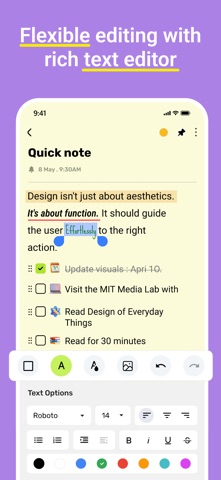
5. Rich Text Formatting:
• Highlight important sections, change font styles, or add headings for better readability.
• Use colour-coding to differentiate tasks, ideas, or categories.
• Add hyperlinks, bullet points, and numbered lists for structured content.
6. Search and Filter: Find Notes Instantly
• Use search options to find notes by keywords, tags, or creation dates.
• Apply filters to locate specific types of notes, such as archived items or those with reminders.
7. Create Reminders for Crucial Tasks
• Never forget important tasks again by setting reminders for your critical to-dos or deadlines.
• Receive push notifications or alerts when the reminder is due, ensuring you stay on track.
• Customise reminders to repeat on specific dates.