FT Control for YAESU

FT Control for YAESU Summary
FT Control for YAESU is a mobile iOS app in Tools by Marcus Roskosch. Released in Feb 2025 (1 year ago). It has 10 ratings with a 4.30★ (good) average. Based on AppGoblin estimates, it reaches roughly 28 monthly active users . Store last updated Sep 3, 2026
FT Control for YAESU SDKs Summary
App not yet scanned for SDKs.
4.3★
Ratings: 10
Screenshots



App Description
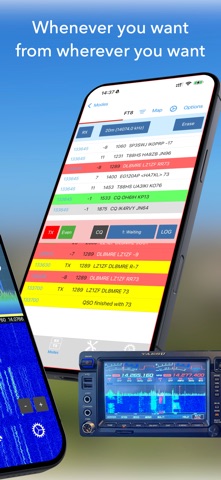
FT Control for YAESU is an innovative Software Defined Radio (SDR) client designed specifically for iPad and iPhone users, allowing comprehensive control and operation of selected YAESU transceivers. Developed to maximize the capabilities of the FT-710, FTdx-10, and FTdx-101 (D or MP) models, this app is your gateway to operating your transceiver seamlessly, both locally and remotely via the internet.
KEY FEATURES
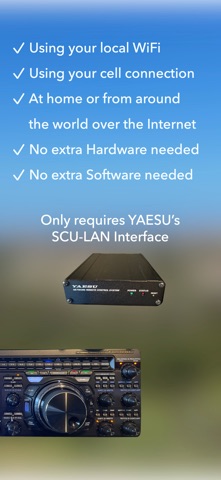
■ Full Control Anywhere: Operate your YAESU transceiver locally at home or from anywhere in the world with an internet connection through the YAESU SCU-LAN10 network interface.
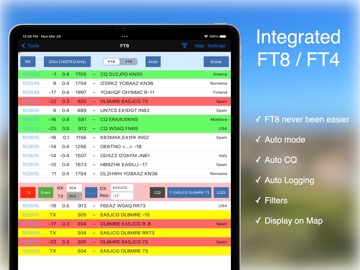
■ Integrated Digital Modes: Use built-in tools for FT8, FT4, CW, Weather FAX and SSTV (NEW!) without the need for external software.
■ Logging: Maintain a comprehensive logbook with automatic logging, ADIF import/export.
■ Dual VFO and Waterfalls: Manage dual VFO settings and view real-time dual waterfall displays for detailed frequency insights (dependent on transceiver capabilities).
■ DX-Cluster and Alerts: Stay updated with DX-Cluster integration and personalized alerts for desired callsigns, DXCCs, States or others.
■ Visual and Interactive Features: View radio spots in the waterfall display, check band limits, and see callsigns on a map complete with directional data.
■ CW Operation: Offers unique CW capabilities not supported by YAESU, including remote CW transmission via keyboard or a hardware paddle connected via CTR2/MIDI Controller.
WHAT YOU NEED:
- An YAESU FT-710, FT-dx10 or FTDX-101 (D or MP)
- A YAESU SCU-LAN10 interface
- The Transceiver needs to be connected to the SCU-LAN interface
- The SCU-LAN interface needs to be connected to your local Network
- No USB cable needed or supported
- An iPhone or iPad which runs at least iOS 18
LEARN MORE:
Discover all features here: https://ham-radio-apps.com
Access the full Manual: https://ham-radio-apps.com/manuals
Note: FT-Control for YAESU is independently developed and is not affiliated with or endorsed by YAESU Corporation.