Note Map - Mark Your Map

Note Map - Mark Your Map Summary
Note Map - Mark Your Map is a free, with in-app purchases iOS app in Maps And Navigation by 乐祥 胡. Released in Feb 2026 (7 months ago). Store last updated Aug 18, 2026
Note Map - Mark Your Map SDKs Summary
App not yet scanned for SDKs.
0★
Ratings: 0
Screenshots




App Description
Note Map – Smart Location Notes & Travel Tracker
Turn every place into a memorable story with Note Map! Pinpoint locations on the map, add notes, photos, and manage your annotations effortlessly. Whether you're exploring a new city, planning a trip, or organizing your daily life, Note Map keeps your memories and important spots at your fingertips.
Key Features:
Pin & Annotate: Tap anywhere on the map to add markers, notes, and photos.
Smart Search: Find your annotations instantly with powerful search tools.
Edit & Organize: Update or modify your markers anytime for seamless management.
Nearby Discovery: Search for essential places within 5 km—subway stations, hotels, parks, and more.
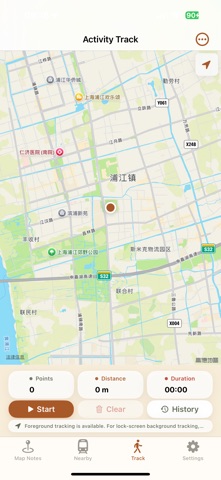
Travel History: Record and revisit your travel routes with detailed trajectory tracking.
Perfect for travelers, students, and professionals who want to map their memories, organize their world, and never miss a place again.
Download Note Map now and start mapping your life!
—Subscription Plans & Auto-Renewal Info
Flexible Subscription Plans for Every Need! Choose the perfect plan for your goals with our diverse subscription options:
* 1 Month: Ideal for project-based users
* 1 Year: Best value for committed users
—Auto-Renewal Details:
* Payment will be charged to your iTunes Account at confirmation of purchase.
* Subscriptions are billed weekly, monthly, bi-monthly, quarterly, semi-annually, or annually based on your chosen plan.
* Subscriptions auto-renew within 24 hours before the current period ends (except Lifetime).
* Renewal charges will be processed within 24 hours before the end of the current period, with the cost depending on your selected plan.
* Manage subscriptions or turn off auto-renewal anytime via your Apple ID Account Settings.
—Lifetime Membership Perks:
* Pay once, unlock all features forever—no renewals, no hassle!
Note:
* Manage subscriptions at: Settings > [Your Name] > Subscriptions
— Privacy Policy please visit:
https://docs.qq.com/doc/DREt1SXJkbG9JYUFT
* **Terms of use (EULA):
* https://docs.qq.com/doc/DREdKR2ZwYUJaa1hr
* **Terms of apple please visit:
* https://www.apple.com/legal/internet-services/itunes/dev/stdeula/