Watermark Editor - Ceal

Watermark Editor - Ceal Summary
Watermark Editor - Ceal is a free, ad-supported, with in-app purchases iOS app in Art And Design by REAFO CO., LTD.. Released in Apr 2025 (1 year ago). It has 4.00 ratings with a 4.00★ (good) average. Based on AppGoblin estimates, it reaches roughly 11 monthly active users and generates around $<10K monthly revenue (27% IAP / 73% ads). Store last updated Sep 9, 2026
Watermark Editor - Ceal SDKs Summary
App not yet scanned for SDKs.
4★
Ratings: 4.00
Screenshots



App Description
Make Your Videos and Images Truly Yours with Custom Watermarks
Ceal makes it easy to create watermarked images and videos by freely placing your own logos and text.
Perfect for social media posts, portfolios, and protecting your creative work.
## ■ Who Is Ceal For?
* Anyone who posts images or videos on social media
* Creators who want to protect their portfolios and artwork
* Anyone who wants to give their work a distinctive branded look
## ■ How It Works
1. Choose a Video or Image
Select the content you want to edit.
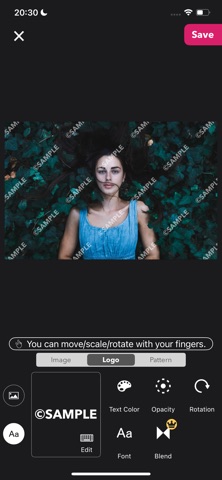
2. Create Your Logo
Design your watermark using text or an image.
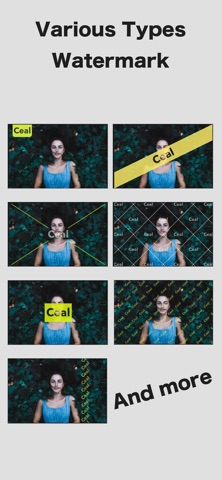
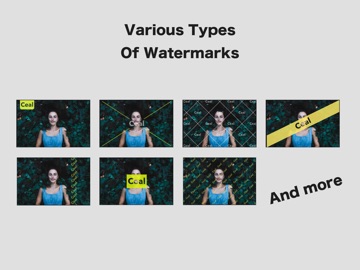
3. Choose a Pattern
Customize how your logo is positioned and repeated.
4. Save and You're Done!
Your watermarked content is ready to use.
## ■ About Logos
Ceal supports two types of logos: Text Logos and Image Logos.
You can freely move, rotate, resize, and customize your logos with your fingers.
・Text Logo
* Choose your font
* Adjust the color
* Adjust the opacity
* Rotate the logo
・Image Logo
* Crop
* Flip
* Round the corners
* Adjust the opacity
* Rotate
## ■ About Patterns
Patterns let you control how your logo is positioned and repeated across your images and videos.
The available settings vary depending on the pattern.
Some video-specific patterns include settings that can only be configured when the playback time is set to 0 seconds.
## ■ Ceal Plus Features
・Blend Modes
Fine-tune how your logo blends with the underlying image or video for a more natural look or a more prominent watermark.
・Exclusive Patterns
Unlock advanced patterns available only with Ceal Plus.
・Batch Mode
Add your logo to multiple images at once. Perfect for preparing a collection of your work for social media or other platforms.
・Ad-Free Experience
Enjoy Ceal without ads.
※ Features available with Ceal Plus can also be previewed in the free version, but you cannot save the results. Try them out with the preview first and see what Ceal Plus can do for you!
-----------------
[Term Of Use]
https://policies.reafo.io/terms/ceal/en/
[Privacy Policy]
https://policies.reafo.io/privacy/en/