AI Avatar Maker: Photo to Art

AI Avatar Maker: Photo to Art Summary
AI Avatar Maker: Photo to Art is a free, with in-app purchases iOS app in Art And Design by Mugenyi Henry. Released in Feb 2025 (1 year ago). Store last updated Jan 21, 2026
AI Avatar Maker: Photo to Art SDKs Summary
App not yet scanned for SDKs.
0★
Ratings: 0
Screenshots

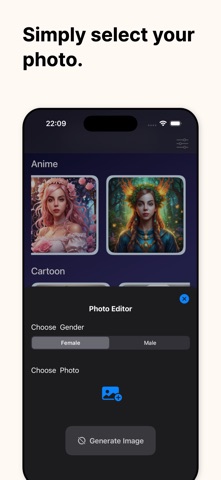


App Description
Tired of boring profile pictures? Turn your ordinary selfies into extraordinary digital art with AI Avatar Maker! Using advanced AI technology, you can transform your photos into high-quality avatars in hundreds of different styles.
Whether you want to see yourself as a 3D animation character, a stunning oil painting, a futuristic cyberpunk hero, or a classic anime protagonist, our app makes it happen instantly.
Key Features:
- AI-Powered Generation: Simply upload your photo and let our powerful AI engine do the magic.
- 100+ Unique Styles: Choose from Cartoon, Anime, 3D Render, Cyberpunk, Sketch, Oil Painting, and more.
- High Resolution: Export your avatars in HD, perfect for Instagram, TikTok, Discord, and WhatsApp.
- Daily Style Updates: We regularly add new art styles and trending filters to keep your look fresh.
- Simple Interface: No professional design skills needed. Just tap, generate, and share.
How it works:
1. Upload a clear photo of yourself or a friend.
2. Select your favorite avatar style from our library.
3. Wait a few seconds for the AI to generate your unique masterpiece.
4. Download and share your new digital identity!
Perfect for creating unique social media icons, gaming avatars, or personalized digital gifts. Express your creativity and stand out from the crowd with AI Avatar Maker.
Subscription Information:
Unlock all premium styles, get priority processing, and enjoy an ad-free experience with our Pro Subscription. Choose from weekly, monthly, or yearly plans. Payment will be charged to your iTunes Account at confirmation of purchase. Subscriptions automatically renew unless auto-renew is turned off at least 24-hours before the end of the current period.
Subscription Information:
– App usage is limited and needs a subscription for unlimited access.
– Subscription Length: Weekly and Yearly
– Free Trial: If offered, it will automatically convert to a paid subscription unless canceled.
– Payment: Charged to your Apple ID account at confirmation of purchase.
– Auto-Renewal: Automatically renews unless canceled at least 24 hours before the end of the current period.
– Renewal Charge: Your account will be charged within 24 hours before the end of the current period, based on the selected plan.
– Managing Subscription: Users can manage subscriptions and turn off auto-renewal in Account Settings on the App Store.