Authenticator: Password Keeper

Authenticator: Password Keeper Summary
Authenticator: Password Keeper is a free, with in-app purchases iOS app in Tools by Crossing Pub. Released in Mar 2025 (1 year ago). It has 19 ratings with a 4.37★ (good) average. Based on AppGoblin estimates, it reaches roughly 41 monthly active users and generates around $<10K monthly revenue (100% IAP / 0% ads). Store last updated Mar 25, 2025
Authenticator: Password Keeper SDKs Summary
App not yet scanned for SDKs.
4.37★
Ratings: 19
Screenshots

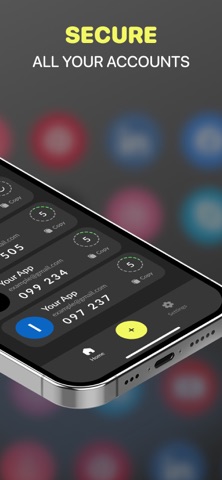

App Description
The App is your go-to, free solution for managing two-factor (2FA) and multi-factor (MFA) authentication on your iPhone and iPad. Safeguard your online accounts—like Facebook, Google, Instagram, Microsoft, Roblox, and thousands more—using secure 2FA codes. Whether securing emails, social media profiles, or financial accounts, KeyGuard provides reliable and free two-factor authentication. Download it today on your iPhone or iPad to take control of your online security!
Why?
Goes beyond just two-step verification. It’s a comprehensive solution for managing 2FA codes, passwords, and overall digital security. Whether you’re in need of an authenticator app, a password manager with autofill, or even a built-in VPN, KeyGuard offers unmatched convenience and security.
Key Features:
Two-Factor Authentication (2FA):
Safeguard your accounts with time-based codes (OTP, TOTP). Works perfectly with Google, Facebook, Microsoft, Instagram, and more.
Password Manager with Autofill:
Safely store, organize, and autofill your passwords. Effortlessly generate strong, unique passwords.
Encrypted Backups:
Keep your 2FA codes and passwords secure with end-to-end encrypted iCloud backups.
Cross-Device Sync:
Access your 2FA codes and passwords across your iPhone, iPad, and other Apple devices in real-time.
Offline Access:
Generate 2FA codes without an internet connection, ensuring continuous protection.
Advanced Security Options:
Lock the app with Touch ID, Face ID, or a secure PIN for extra security, ensuring only you can access your data.
Built-In VPN Protection:
Secure your online connection and browse safely with an integrated VPN.
Getting Started is Simple:
Log in to the account you wish to secure (e.g., Google, Facebook, Amazon).
Go to the account's security settings and enable Two-Factor Authentication (2FA).
Choose the "Authentication App" option.
Scan the QR code with the KeyGuard App.
Enter the generated code to confirm the setup.
Enable encrypted backups for extra peace of mind.
Your Data, Fully Secured
App ensures your sensitive data is safe with end-to-end encryption, making sure that only you can access it—whether it’s stored on the cloud or offline. With secure backups, offline access, and seamless device syncing, keeping your data safe has never been easier.
Compatible with Thousands of Services
Protect your favorite accounts, including Gmai