Faceon: Photo Editor & Effects

Faceon: Photo Editor & Effects Summary
Faceon: Photo Editor & Effects is a free, ad-supported, with in-app purchases iOS app in Tools by Appenvision Ltd. Released in Mar 2026 (7 months ago). It has 6.00 ratings with a 3.99★ (average) average. Based on AppGoblin estimates, it reaches roughly 28 monthly active users and generates around $<10K monthly revenue (66% IAP / 34% ads). Store last updated Mar 4, 2026
SDK intelligence: AppGoblin detected 14 ad networks(e.g. Google), 3 development tools, 3 analytics: attribution,and 1 analytics: product integrated into Faceon: Photo Editor & Effects. View full SDK list →
Faceon: Photo Editor & Effects SDKs Summary
Faceon: Photo Editor & Effects was last scanned for SDKs on 2026-09-27. Below is the overview of third-party companies detected in the app. The full list of SDKs, permissions and unknowns is available here.
 Google
 Facebook
 AppLovin
 Unity
Unity Airbnb Engineering
 nanopb
 AppsFlyer
 Adjust
 AppMetrica
 Firebase
3.99★
Ratings: 6.00
Screenshots


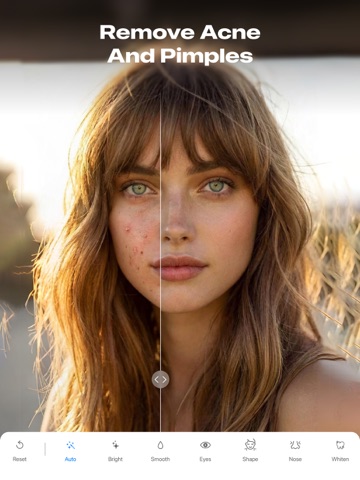
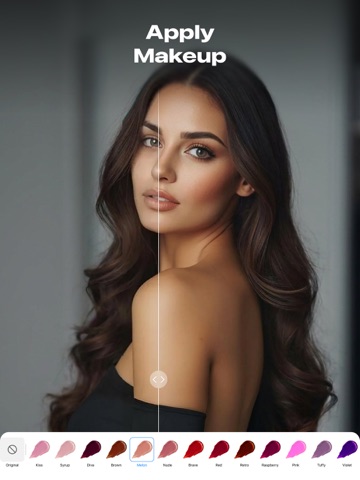
App Description
Looking for an easy way to make your photos look more expressive?
This app helps you reveal color, depth, and character in just a few taps. Bring out the best in every portrait with an intelligent, easy-to-use photo editor. Whether you want a natural touch-up or a creative transformation, the app gives you control to reshape photo details with precision and ease.
Key Features
- Skin smoothing and tone correction;
- Teeth whitening;
- Hair and eyes color change;
- Shape and size control for eyes, lips, nose, and brows;
- Aesthetic filters for the entire photo;
- Light, texture, and overlay effects;
- Multiple blur styles;
- Exposure and brightness control;
- Contrast and saturation tuning;
- Free and preset cropping ratios;
- Before & after comparison.
Enhance Your Look
Start by giving your image a clean, expressive look. Built-in enhancement tools help brighten the scene, correct lighting, and refine facial features for a more balanced result. You can also make simple changes — like adjusting brightness or adding a soft glow — to achieve the look you want.
Express Yourself With Makeup
Explore creative makeup options that shape the aesthetic of your portrait. Try new eye shades, experiment with lip colors, or adjust hair tint to suit the style. These tools blend smoothly into the photo, helping you elevate the look or create something more vibrant.
Reshape With Precision
Small adjustments can change how a portrait feels. Refine contours or shift proportions with gentle movements to bring features into better balance and subtly adjust face shape. The result looks natural — like capturing the photo from a better angle.
Artistic Effects & Filters
Filters and effects help set the emotional tone of your photo. Warm up colors for a cozy feel, add a cinematic shade, or apply creative effects to the background while keeping the subject clear. Each option brings its own atmosphere, making it easy to match your vision.
Advanced Blur Tools
Add depth or highlight your subject with smooth blur effects. Softening the background, directing focus to the face, or blurring custom areas guides attention and makes your content feel more polished.
Tone, Light & Color Adjustments
Fine-tune the emotional feel of your photo with thoughtful controls. Adjust contrast for clarity, shift temperature, or boost saturation to make colors more alive. Even small changes can tran