Waketag Pro: Music Tag Editor

Waketag Pro: Music Tag Editor Summary
Waketag Pro: Music Tag Editor is a ad-supported iOS app in Music And Audio by Kaka Inc. Released in Apr 2025 (1 year ago). It has 13 ratings with a 4.77★ (excellent) average. Based on AppGoblin estimates, it reaches roughly 61 monthly active users and generates around $<10K monthly revenue (0% IAP / 100% ads). Store last updated Aug 14, 2026
Waketag Pro: Music Tag Editor SDKs Summary
App not yet scanned for SDKs.
4.77★
Ratings: 13
Screenshots




App Description
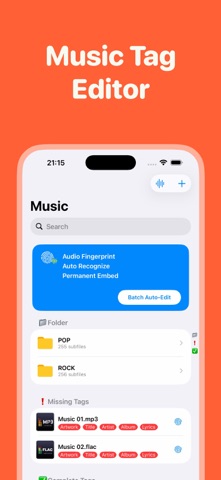
Are your imported music files plagued by "Unknown Artist," "Unknown Album," or corrupted text and gibberish? Are you exhausted from manually searching for high-res album art and copying lyrics track by track?
Meet Waketag, the ultimate next-generation music metadata editor crafted for casual audiophiles, hardcore music collectors, and digital creators. Built on a powerful, industrial-grade architecture, Waketag completely eliminates the flaws of traditional taggers that fail to save data permanently. With robust support for dozens of audio formats, Waketag delivers a seamless, professional library organization experience right at your fingertips.
Try Waketag Premium with a 3-Day Free Trial and experience the gold standard of music library management!
◆◆◆ Core Features:
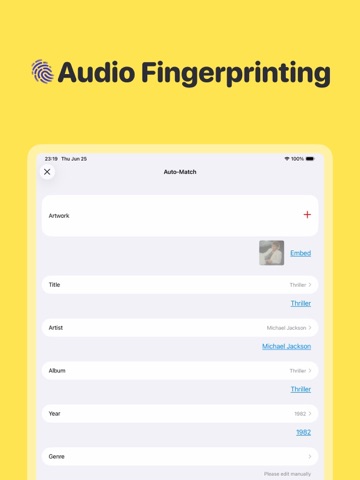
1. Cutting-Edge Audio Fingerprinting (AI Match)
Say goodbye to tedious manual typing. With our revolutionary V3.0 infrastructure, Waketag analyzes the unique "acoustic fingerprint" of your audio for precise global matching. Automatically fetch and fill in track titles, artists, albums, release years, genres, lyrics, and stunning high-resolution artwork in seconds. One click, and your entire library is perfectly recognized.
2. Permanent, Lossless Tag Embedding
Read, edit, and write metadata seamlessly across an extensive range of formats, including MP3, FLAC, WAV, M4A, DSF, DSD, APE, OPUS, OGG, MP4, and legacy trackers (S3M, XM, IT, MOD). Metadata is written directly into the file structure, ensuring your tags are permanently embedded and permanently visible across all media players.
3. Blazing-Fast Batch Processing
Importing thousands of audio files at once? No problem. Powered by a fully optimized concurrent engine, our multi-threaded batch editor works flawlessly in the background. It maximizes your device's multi-core performance while offering instant pause/cancel controls—delivering zero freezes, zero crashes, and peak memory efficiency.
4. Seamless Cloud Storage & NAS Integration
Your music shouldn't be locked to a single drive. Streamline your workflow by connecting directly to WebDAV, NAS, Navidrome, Google Drive, Dropbox, and other cloud services. Edit, organize, and manage your cloud-hosted audio library effortlessly.
5. Premium Native iOS & macOS Experience
Deeply integrated into the Apple ecosystem. Waketag is fully optimized for iOS, iPadOS, and macOS, providing a