Photo Cleaner:Phone Cleaner

Photo Cleaner:Phone Cleaner Summary
Photo Cleaner:Phone Cleaner is a free, with in-app purchases iOS app in Photo And Video by 航 余. Released in Aug 2025 (11 months ago). It has 6.00 ratings with a 4.17★ (good) average. Based on AppGoblin estimates, it reaches roughly 48 monthly active users and generates around $<10K monthly revenue (100% IAP / 0% ads). Store last updated Aug 10, 2026
Photo Cleaner:Phone Cleaner SDKs Summary
App not yet scanned for SDKs.
4.17★
Ratings: 6.00
Screenshots

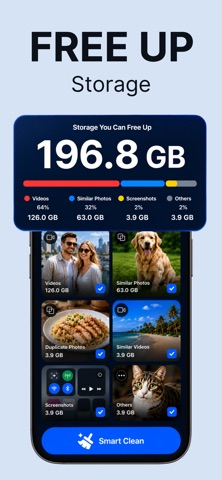


App Description
Is your iPhone running slower? Running out of storage space? Looking for a professional, ad-free iPhone cleaner and photo organizer? Try PixCleaner.
PixCleaner is a smart photo and video organizer that helps keep your iPhone cleaner, faster, and easier to manage.
With advanced on-device AI analysis, PixCleaner helps you quickly find photos and videos that take up storage space, while keeping your personal memories safe and organized.
Why Choose PixCleaner?
• Ad-Free Experience
No pop-ups, no distractions, and no forced ads. Enjoy a clean photo and video organizing experience.
• Smart AI Analysis
Scan your photo library and detect duplicates, similar items, blurry photos, screenshots, text-heavy images, large videos, and more.
• Privacy First
All analysis happens locally on your device. Your photos and videos are never uploaded to any server.
Key Features
• Similar Photo Cleanup
Find highly similar photos, such as burst shots, repeated saves, and photos taken from different angles, so you can choose the best ones to keep.
• Similar Video Detection
Identify video clips with similar content and reduce unnecessary storage usage.
• Duplicate Photo Detection
Find exact duplicate photos and remove useless copies.
• Blurry Photo Detection
Detect out-of-focus, blurry, or low-quality photos for easier cleanup.
• Screenshot Organization
Group screenshots such as work captures, chat screenshots, and temporary saved images.
• Text Photo Detection
Find photos containing text, including document screenshots, receipts, notes, course materials, and web page screenshots.
• Panorama Photo Management
View large panorama photos separately and decide what to keep or delete.
• Live Photo Management
Organize Live Photos in one place and free up storage space.
• Screen Recording Organization
Find and manage screen recording videos quickly.
• Large Video Detection
Locate the largest video files and reclaim more storage space.
• Video Compression
Compress videos while preserving visual quality as much as possible. Choose from multiple compression levels and preview estimated storage savings before compressing.
Smart Filters and Memories
• Smart Filters
Filter photos and videos by time, type, size, similarity, and more to quickly find items that need cleanup.
• This Day Last Year
Rediscover photos and videos taken on this day one yea