TESDA Skills Passport

TESDA Skills Passport Summary
TESDA Skills Passport is a free iOS app in Education by Technical Education and Skills Development Authority. Released in Feb 2026 (8 months ago). It has 1.00 ratings with a 5.00★ (excellent) average. Based on AppGoblin estimates, it reaches roughly 6.00 monthly active users . Store last updated Aug 4, 2026
TESDA Skills Passport SDKs Summary
App not yet scanned for SDKs.
5★
Ratings: 1.00
Screenshots
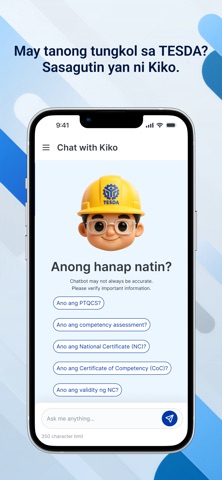


App Description
The TESDA Skills Passport is the all-in-one app developed by the Technical Education and Skills Development Authority (TESDA), under the leadership of Sec. Kiko Benitez, to serve Filipinos by providing Training to Trabaho. The super-app streamlines the tech-voc experience for Filipino learners, integrating learning, certification management, job matching, scholarships, and location-based support into one platform. Kung gusto mo ng bagong skills para sa career mo, kayang kaya ‘yan sa TESDA Skills Passport!
Features
1. Skills Passport — The heart of the application, the Skills Passport allows users to:
• View all TESDA National Certificates (NCs) and completed TESDA trainings.
• Track active, expired, and completed certifications.
• Add certificates and trainings earned outside TESDA.
• Generate a QR code-enabled digital résumé that can be shared with employers and clients.
2. Job Opportunities & Freelance Work — The app supports post-training employability through:
• Find Jobs: A consolidated list of job vacancies from TESDA’s partner job platforms, filterable by skills, location, and salary.
• Find a TESDAn: A freelancing marketplace where TESDA graduates can offer services and get matched with fellow users seeking technical assistance.
To access these, users complete a job profile containing their skills and experiences.
3. Learning Paths (TESDA Online Program) — A direct link to the TESDA Online Program (TOP) allows users to:
• Explore and enroll in free online TESDA courses.
• Receive personalized course recommendations based on existing credentials and training history.
4. Scholarships — The app displays real-time scholarship updates synchronized with the Biometric-enabled Scholarship Registration System (BSRS). Users can:
• View scholarships filtered by location or qualification.
• Apply digitally through in-app forms.
• Track the status of their application via the app or BSRS website.
5. Centers Near Me (Maps Integration) — Using the device’s GPS, users can locate:
• TESDA Technology Institutions (TTIs)
• Private and public TVET centers
• Accredited assessment centers
Filters enable searches by qualification, region, center type, or course offered. Users may also get directions through their device’s map application.
6. Professor K, the AI Chatbot — The app, through Professor K, is capable of