Print from Phone - Printly

Print from Phone - Printly Summary
Print from Phone - Printly is a free, with in-app purchases iOS app in Business by Futsum Semhar. Released in Jul 2025 (1 year ago). It has 337 ratings with a 4.58★ (excellent) average. Based on AppGoblin estimates, it reaches roughly 1.5K monthly active users and generates around $<10K monthly revenue (100% IAP / 0% ads). Store last updated Aug 10, 2025
SDK intelligence: AppGoblin detected 4 development tools(e.g. Flutter), 1 business tools,and 1 analytics: product integrated into Print from Phone - Printly. View full SDK list →
Print from Phone - Printly SDKs Summary
Print from Phone - Printly was last scanned for SDKs on 2026-09-09. Below is the overview of third-party companies detected in the app. The full list of SDKs, permissions and unknowns is available here.
 Flutter
 Google
 SDWebImage
 nanopb
 RevenueCat
 Firebase
4.58★
Ratings: 337
Screenshots


App Description
Printly: Efficient Mobile Printing and Scanning Solution
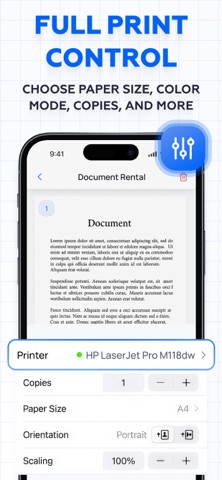
Printly allows you to print popular document formats directly from your mobile device. Seamlessly connect to printers, customize your print settings, and manage your prints with ease. The app also features a built-in scanner that utilizes your phone's camera to instantly scan and print documents.
Key Features:
1. Direct Mobile Printing: Print documents in various formats directly from your phone.
2. Printer Connectivity: Quickly connect to compatible printers with a simple setup process.
3. Customizable Print Settings: Adjust print preferences to suit your needs, including color, paper size, and quality.
4. Built-In Scanner: Use your device's camera to scan, digitize, and print documents instantly.
Subscription plans:
1. Weekly subscription
2. Annual subscription
Privacy Policy: https://printlyapp.org/privacy
Terms of Use: https://printlyapp.org/terms