Dot Counter: Count Anything

Dot Counter: Count Anything Summary
Dot Counter: Count Anything is a free, with in-app purchases iOS app in Tools by Victor Edu. Released in Aug 2025 (1 year ago). It has 3.00 ratings with a 4.67★ (excellent) average. Based on AppGoblin estimates, it reaches roughly 9.00 monthly active users and generates around $<10K monthly revenue (100% IAP / 0% ads). Store last updated Jan 26, 2026
Dot Counter: Count Anything SDKs Summary
App not yet scanned for SDKs.
4.67★
Ratings: 3.00
Screenshots

App Description
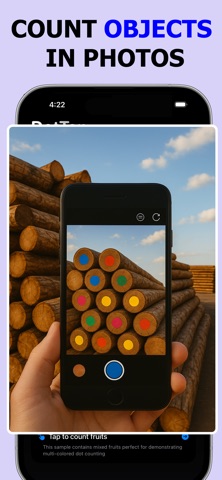
Dot counter makes counting objects in photos fast, accurate, and satisfying. Simply tap anywhere on your image to drop a colored dot and watch your tally grow in real-time.
Whether you're counting inventory, verifying items, tallying people in a crowd, or just curious about quantities in any image — DotTap gives you a simple, visual way to count anything.
No guessing.
No losing track.
Just tap and count.
HOW IT WORKS
• Open any image from your camera, photo library, or files
• Tap to place colored dots on objects you want to count
• Watch your count update instantly
• Use different colors to categorize and count multiple types of items
• Zoom and pan to count precisely in detailed images
• Export your marked image or count report
PERFECT FOR
• Inventory and stock counting
• Event planning and crowd estimation
• Research and data collection
• Education and classroom activities
• Quality control and verification
• Anyone who needs to count objects visually
KEY FEATURES
• Multiple colored markers for categorizing different items
• Real-time count display
• Undo, redo, and clear functions
• Pinch to zoom and pan for precision
• Export marked images
• Dark mode support
• Clean, intuitive interface
DotTap is designed to be fast, simple, and practical. No complicated setup, no learning curve — just open an image and start tapping.
Subscription Information:
• DotTap offers optional premium features through subscription
• Weekly subscription: $2.99/week
• Yearly subscription: $19.99/year
Subscription automatically renews unless turned off at least 24 hours before the current period ends.
Terms: https://www.apple.com/legal/internet-services/itunes/dev/stdeula/
Privacy Policy: https://www.termsfeed.com/live/3e6cb4c6-367b-42b1-a020-8d57fcf2a769