Convert to PDF: Photo Scanner

Convert to PDF: Photo Scanner Summary
Convert to PDF: Photo Scanner is a free, with in-app purchases iOS app in Tools by Maksim Artemov. Released in Aug 2025 (1 year ago). It has 14 ratings with a 5.00★ (excellent) average. Based on AppGoblin estimates, it reaches roughly 35 monthly active users and generates around $<10K monthly revenue (100% IAP / 0% ads). Store last updated Aug 7, 2025
Convert to PDF: Photo Scanner SDKs Summary
App not yet scanned for SDKs.
5★
Ratings: 14
Screenshots

App Description
Turn Photos, Files & Scans into PDFs — Instantly
Need to convert photos, documents, or scans into a clean, professional PDF? Whether you’re a student submitting assignments, a professional sharing contracts, or just organizing personal paperwork — our app makes PDF creation simple, fast, and secure.
No clutter. No complicated tools. Just tap, convert, and go.
KEY FEATURES
√ Convert Anything to PDF
Combine images, documents, scans, or files into one sleek PDF — all from your phone.
√ Smart Document Scanner
Use your camera to scan physical documents with auto-crop and enhancement for clear results.
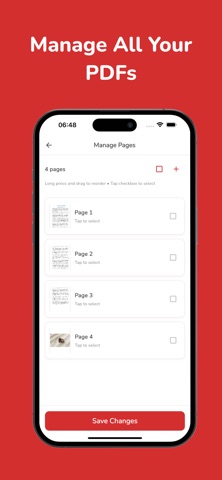
√ Merge & Organize Pages
Easily merge multiple files, reorder pages, and rename your PDFs to keep things tidy.
√ Password Protection
Keep private files safe by locking your PDFs with a secure password.
√ Compress PDF Size
Shrink your PDF files to save storage and send faster without losing quality.
√ Offline & Private
Works fully offline – no internet required, and your files stay on your device.
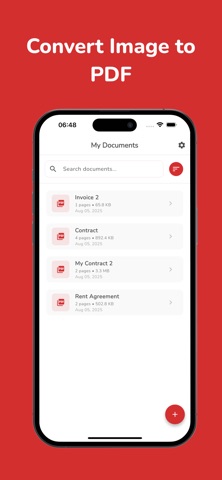
√ Built-in File Manager
Quickly find, rename, delete, or share PDFs right from the app.
WHY OUR APP?
Unlike complicated document tools, our app is designed to be:
- Fast: Create PDFs in seconds – no tech skills required
- Simple: A clean, intuitive interface built for real people
- Secure: No forced uploads or cloud syncing – your data stays yours
- Reliable: No ads, no distractions, just your documents done right
Whether you need to send a signed contract, submit homework, or save travel documents — this is the only PDF tool you’ll need.
Download now to start converting and scanning PDFs.
Need more power? Go Pro to unlock password protection, compression, unlimited usage & more.
Your documents. Your way. All in one app.
If you opt to purchase a Premium or Boost subscription, the subscription fee will be charged to your iTunes account. The yearly subscription automatically renews, but you can disable auto-renewal at least 24 hours before the end of the subscription period in your iTunes account settings. After purchase, any unused portion of the free trial is forfeited. You can manage your premium subscription and turn off the auto-renewal feature in your iTunes account settings.
Read our full Terms of Use: https://artmvstd.com/terms/