Focus Tomato 2: Pomodoro Timer

Focus Tomato 2: Pomodoro Timer Summary
Focus Tomato 2: Pomodoro Timer is a free, with in-app purchases iOS app in Productivity by CHIH-SHAN LIU. Released in Aug 2025 (1 year ago). It has 34 ratings with a 4.71★ (excellent) average. Based on AppGoblin estimates, it reaches roughly 136 monthly active users and generates around $<10K monthly revenue (100% IAP / 0% ads). Store last updated Jul 30, 2026
Focus Tomato 2: Pomodoro Timer SDKs Summary
App not yet scanned for SDKs.
4.71★
Ratings: 34
Screenshots



App Description
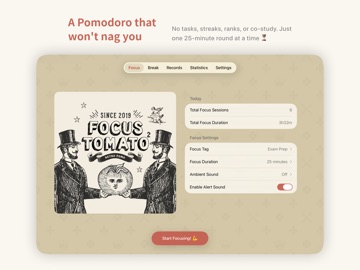
A retro Pomodoro timer that does not push too hard.
No tasks, no achievements, no leaderboards. Just something to help you get through one 25-minute session at a time.
The original Focus Tomato earned a 4.9 / 5.0 rating, 27,000+ reviews worldwide, and multiple Apple editorial features.
Focus Tomato 2 keeps the same spirit, now with focus tags, iCloud sync, and richer stats.
Focus Tomato 2 is made to help you stay focused without feeling trapped.
It helps you face the real work, keep going longer, and still leave room to breathe.
Finish things gracefully, close the tomato, and enjoy your actual time off.
—
Q: You study for hours, but still feel like you are falling behind?
A: Break time into 25-minute sessions, sit down, and ease yourself into focus.
The Pomodoro method is simple: reduce distractions, lower procrastination, and make it easier to start and keep going.
Q: You work hard for a few days, then lose momentum?
A: Use a rhythm of 25 minutes of focus and 5 minutes of rest, so you do not burn yourself out all at once.
Focus is not about forcing yourself to the end. Rest well, and you can go further.
Q: You want to learn something outside school or work, but cannot keep it going?
A: Focus Tomato helps you set aside dedicated time for long-term goals, then track them clearly with tags.
Use tags like “content creation,” “design study,” or “exam prep” to track courses, video editing, reading plans, and more.
One or two tomatoes a day can help long-term goals slowly add up, instead of being swallowed by small daily chores.
—
Core features:
1. No forced stop, so your flow can continue
Many Pomodoro timers push you to stop when time is up. Focus Tomato only reminds you that time is up, without forcing you out of flow.
2. Editable timeline, with manual entries and adjustments
Forgot to stop the timer? No problem. You can add or edit records manually, so your history stays closer to reality.
3. Start a break anytime, and take another if needed
Rest is not just an add-on after focus. Accidentally worked through your 5-minute break? Take another one right away. Choose a short or long break whenever you need it.
4. Break overtime is tracked too, for better pacing
If your break runs longer than planned, Focus Tomato keeps timing and records it. Rest is not blank space. It becomes part of your real rhythm.
5. Custom tags, paired with s