Resume CV Builder: AI Maker

Resume CV Builder: AI Maker Summary
Resume CV Builder: AI Maker is a free, with in-app purchases iOS app in Tools by Zigrids Mucenieks. Released in Sep 2025 (1 year ago). It has 1.00 ratings with a 5.00★ (excellent) average. Based on AppGoblin estimates, it reaches roughly 5.00 monthly active users and generates around $<10K monthly revenue (100% IAP / 0% ads). Store last updated Oct 2, 2025
Resume CV Builder: AI Maker SDKs Summary
App not yet scanned for SDKs.
5★
Ratings: 1.00
Screenshots


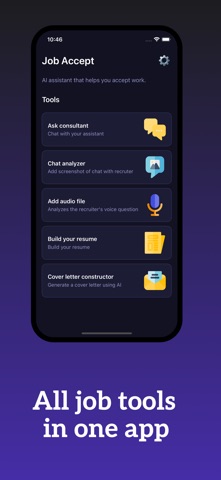
App Description
Job Accept – Your AI Career Assistant
Land your next job faster with Job Accept, the all-in-one app for interviews, resumes, and career success. Whether you’re preparing for HR questions, practicing live conversations, or building a professional CV, Job Accept gives you everything you need in one place.
What you can do:
• Scan and analyze interviews – record or upload HR interview audio, get instant AI insights and feedback
• Practice dialogs with AI – simulate realistic HR and technical interviews, refine your answers in real time
• Generate professional CVs and cover letters – tailored to your skills, roles, and industries
• Prepare for questions that matter – STAR answers, salary talk, HR rounds, technical screening
• Organize and archive files – store CVs, cover letters, interview notes, and recordings in one place
• Improve phrasing and clarity – AI helps you sound confident, structured, and professional
Why candidates love Job Accept:
• Smart: AI guidance based on real hiring practices
• Fast: From draft CV to mock interview in minutes
• Focused: Content optimized for HR and recruiter expectations
• Flexible: Multiple CV templates and answer styles
Your career deserves more than luck. With Job Accept, you will always walk into interviews prepared, confident, and ready to impress.
Subscription Information:
- Payment. Charges apply to your iTunes Account at purchase confirmation.
- Auto-Renewal. Subscriptions renew automatically unless canceled at least 24 hours before the current period ends.
- Renewal Charges. Your account will be charged for renewal within 24 hours prior to the end of the current period, based on the selected plan.
- Manage Your Subscription. Go to your Account Settings after purchase to handle auto-renewal and other preferences.
Privacy Policy: https://telegra.ph/Terms-of-Use-for-Job-Accept-09-04
Terms Of Use: https://telegra.ph/Privacy-Policy-for-Job-Accept-09-04