CapCut Pad

CapCut Pad Summary
CapCut Pad is a free iOS app in Photo And Video by Bytedance Pte. Ltd. Released in May 2026 (4 months ago). It has 1.2K ratings with a 4.33★ (good) average. Based on AppGoblin estimates, it reaches roughly 4.9K monthly active users . Store last updated Oct 12, 2026
Recent activity: 104 new ratings this week View trends →
CapCut Pad SDKs Summary
App not yet scanned for SDKs.
4.33★
Ratings: 1.2K
Screenshots


App Description
Try out CapCut Pad version!
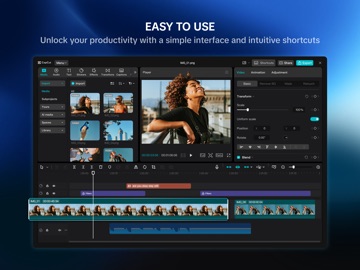
CapCut Pad brings desktop-level editing power to your fingertips. Enjoy precise multi-track timeline editing, smooth performance, and a creative workspace designed for touch.
CapCut offers easy-to-use video and photo editing tools, a wide range of in-app fonts and effects, and powerful features like keyframe animation, smooth slow motion, chroma key, and video stabilization—everything you need to capture and refine your moments.
Create high-quality videos with other unique features: auto captions, text-to-speech, motion tracking, and background removal. Show your personality and go viral on TikTok, YouTube, Instagram, WhatsApp, and Facebook!
FEATURES
Basic Video Editing
• Trim and shorten clips, and split or merge videos.
• Adjust video speed from 0.1x to 100x, and apply smooth speed curves.
• Animate video clips with zoom in/out effects.
• Highlight your best moments with the freeze frame feature.
• Add creative transitions between clips.
Advanced Video Editing
• Keyframe animation supported for all settings.
• Create smooth slow motion with optical flow and speed curves.
• Use chroma key to remove specific colors.
• Arrange and preview multiple clips on a multi-track timeline.
• Apply stabilization to keep your footage steady.
Intelligent Features
• Auto captions: generate subtitles automatically using speech recognition.
• Text-to-speech: convert text into voice in multiple languages and tones.
• Background removal: remove backgrounds automatically with one click.
Text & Stickers
• Add text with diverse fonts and styles, or use creative templates.
• Subtitles can be directly adjusted on the video timeline.
Trending Effects & Filters
• Explore weekly updated filters that match trending styles.
• Apply hundreds of visual effects including Glitch, Blur, and 3D.
• Adjust brightness, contrast, and saturation freely.
Music & Sound Effects
• Add music tracks or sound effects to your videos.
• Extract audio, clips, or recordings from existing footage.
Easy to Share
• Export videos up to 4K 60fps with smart HDR.
• Customize resolution and format, then share directly to social platforms.
CapCut is a all-in-one video editor and video maker application with everything you need to create stunning, high-quality videos. Beginners can get started with CapCut in a matter of s