Subscription Tracker SubsMange

Subscription Tracker SubsMange Summary
Subscription Tracker SubsMange is a free, with in-app purchases iOS app in Finance by Pinak Faldu. Released in Nov 2025 (11 months ago). Store last updated Jul 10, 2026
Subscription Tracker SubsMange SDKs Summary
App not yet scanned for SDKs.
0★
Ratings: 0
Screenshots




App Description
Tired of losing track of your subscription spending? Subwise helps you take control of every recurring payment—from Netflix and Spotify to productivity tools like Figma and Slack.
See exactly how much you spend each month, track upcoming payments, and discover opportunities to save money. All in one beautiful, easy-to-use app.
WHY CHOOSE SUBWISE?
See Your Total Spending Instantly
Get a crystal-clear view of your yearly and monthly subscription costs. No more surprise charges on your credit card statement.
Visualize Spending Patterns
Beautiful charts show exactly where your money goes each month. Spot trends, identify expensive subscriptions, and make smarter decisions.
Never Miss a Payment Again
Track upcoming renewals and see which subscriptions are due soon. Mark payments as paid to stay perfectly organized.
Organize by Payment Method
Know exactly which credit card or bank account is linked to each subscription. Essential for managing multiple payment sources.
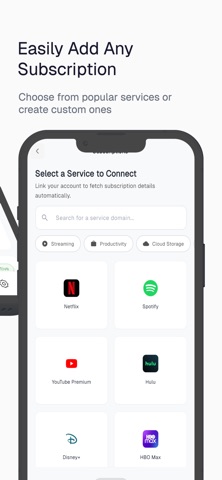
Add Subscriptions in Seconds
Choose from hundreds of popular services including:
- Streaming: Netflix, Spotify, YouTube Premium, Disney+, Hulu, HBO Max
- Productivity: Figma, Slack, Notion, Trello, Asana
- Cloud Storage: Dropbox, Google Drive, iCloud
- And many more—or create custom subscriptions for any service
Beautiful & Intuitive Design
A clean, modern interface that makes subscription tracking effortless. No complicated features—just what you need to stay in control.
PERFECT FOR
- Anyone juggling multiple streaming services
- Freelancers managing business software subscriptions
- Families tracking shared household services
- Budget-conscious individuals looking to cut costs
- People who want clarity on monthly recurring expenses
HOW SUBWISE WORKS
1. Add Your Subscriptions
Select from popular services or add custom ones. Enter the amount, billing frequency (weekly, monthly, yearly), and payment method.
2. View Your Dashboard
See your total yearly spending, active subscription count, and upcoming payments—all at a glance.
3. Track Spending Over Time
Check detailed charts to see how your subscription costs fluctuate month by month. Identify spending spikes instantly.
4. Stay Organized
Mark payments as complete, add personal notes, and keep every subscription detail in one secure place.
START SAVING TODAY
Most people don't realize they're spending hundreds of dollars monthly