Robi SecureBoard

Robi SecureBoard Summary
Robi SecureBoard is a free iOS app in Business by Robi Axiata Limited. Released in Nov 2025 (9 months ago). Store last updated Jun 23, 2026
Robi SecureBoard SDKs Summary
App not yet scanned for SDKs.
0★
Ratings: 0
Screenshots


App Description
Overview
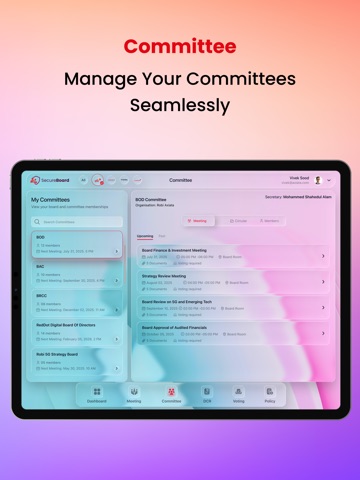
The Board Paper Portal is a secure, iPad-optimized application designed to streamline board and committee management processes for organizations. It centralizes user management, meeting scheduling, agenda creation, voting, and communication in one integrated system.
The application supports multiple user roles — Admin, Secretary, Member, and Non-Member — with role-based access control (RBAC) to ensure appropriate access and operational security.
The portal enhances efficiency, compliance, and collaboration among committee members by eliminating manual processes, reducing paper dependency, and providing a digital, audit-ready environment for all board activities.
Requirement Details
1. User Management
• Create Users:
Admins can create users by entering:
o Company Email
o Full Name
o Mobile Number
o Role: Member, Non-Member, Secretary, or Admin
o If the role is Member, assign the user to a specific Committee.
• Manage Users:
Admins can modify or delete user accounts when needed.
• Onboarding Consent:
During onboarding, members must review and accept predefined consents such as the Code of Conduct or other organizational policies.
2. Committee and Organization Management
• Create Organizations:
Admins or Secretaries can create parent organizations (e.g., Robi Group, Robi, AxEnTec, Reddot) along with subsidiaries.
• Create Committees:
Admins or Secretaries can create committees (e.g., BOD, BAC, BRCC, BNRC, BIC, SLT, CapexCom, PriceCom).
• Manage Committee Structure:
The system allows assignment of Chairperson, Secretary, and other roles, and provides templates for standard committee structures that can be reused across committees.
• Manage Committee Members:
Add or remove members from committees dynamically.
• Create Sub-Committees:
Admins or Secretaries can create sub-committees under any main committee for specialized tasks.
• Display Committees:
Authorized users can view all committees and sub-committees, along with their structure and assigned members.
3. Meeting and Agenda Management
• Create Meetings:
Admin or Secretary can create meetings under a selected committee by specifying:
o Date
o Time
o Venue
The system integrates with Outlook for scheduling and synchronization.
• Email Notifications:
All committee members receive automated email notifications upon meeting creation or updates.
• Crea