Mona for Mastodon

Mona for Mastodon Summary
Mona for Mastodon is a free, with in-app purchases iOS app in Social Networking by Junyu Kuang. Released in Dec 2025 (9 months ago). It has 178 ratings with a 4.28★ (good) average. Based on AppGoblin estimates, it reaches roughly 781 monthly active users and generates around $<10K monthly revenue (100% IAP / 0% ads). Store last updated Sep 22, 2026
Mona for Mastodon SDKs Summary
App not yet scanned for SDKs.
4.28★
Ratings: 178
Screenshots


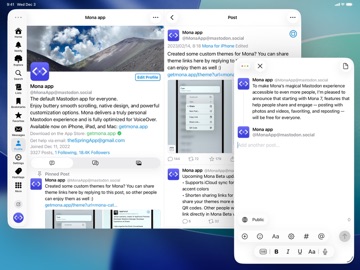
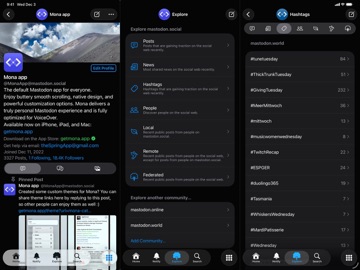
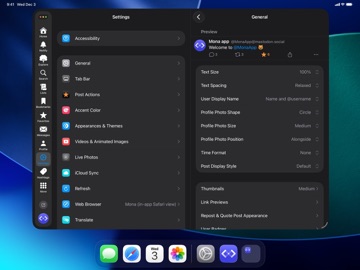
App Description
Meet Mona 7, the default Mastodon app for everyone. Enjoy buttery smooth scrolling, native design, and powerful customization options. It delivers a truly personal Mastodon experience and is fully optimized for VoiceOver.
All Mastodon features that everyone expects:
• Browse timelines like Home, List, and Profiles
• Reply, repost, favorite, bookmark posts with ease
• Explore trending posts and news, plus Local and Federated timelines
iCloud Sync:
• Sync your reading positions, mute list, user notes, drafts, search history, accent colors, and custom app themes across your iPhone, iPad, and Mac, privately and securely
• Optionally disable some features from automatic syncing
User Notes:
• Privately set aliases, notes and username colors for Mastodon accounts
• User Notes list: browse, organize and edit all your notes in one place
Game Controller:
• Control the app and browse posts with a compatible game controller, such as a Playstation DualSense/DualShock, Nintendo Switch, Xbox or MFi controller
• Customize button functions via in-app settings
• Set extra functions for Adaptive Triggers on the Playstation DualSense controller
Privacy:
• Mona does not collect any personal information
• Your account tokens are protected by on-device Keychain
• Your network connections to Mastodon servers are protected by HTTPS
Other Mona features:
• A stunning new experience with the Liquid Glass design
• Post with HDR photos and Live Photos
• Use Genmoji and custom emojis in your posts
• Column View takes full advantage of the big screen on iPad and Mac, shows multiple views at once and allows you to navigate between views fluently and efficiently
• Check recent posts on your home screen or notification center with widgets
• Adjustable text spacing and text sizes
• Share a post as picture
• Open multiple windows on iPad and Mac
• Automatic video and GIF playback on timelines
• Retrieve missing posts with “Load from Remote Server”
• Push notifications
Tab Bar (Mona Ultra feature):
• Pin your frequently visit pages to the tab bar
• Drag tabs into the order you prefer
• Rename your tabs
• Change your tab icons (more than a thousand of icons for you to choose)
• Show/hide tab names
Post Actions (Mona Ultra feature):
• Drag actions into the order you prefer
• Configure actions as swipe options: swipe a post h