Convert to PDF - PDFOn

Convert to PDF - PDFOn Summary
Convert to PDF - PDFOn is a free, with in-app purchases iOS app in Productivity by Soufiane Bouziane. Released in Dec 2025 (10 months ago). It has 1.00 ratings with a 2.00★ (poor) average. Based on AppGoblin estimates, it reaches roughly 4.00 monthly active users and generates around $<10K monthly revenue (100% IAP / 0% ads). Store last updated Feb 22, 2026
Convert to PDF - PDFOn SDKs Summary
App not yet scanned for SDKs.
2★
Ratings: 1.00
Screenshots


App Description
Transform your documents, images, and text files into PDF format with PDFOn — your powerful all‑in‑one PDF converter.
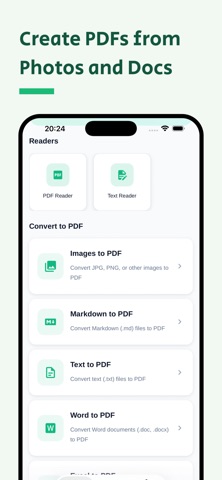
CONVERT OFFICE DOCUMENTS TO PDF
• Word to PDF: Convert DOC and DOCX files to PDF in seconds while preserving formatting, fonts, and layout.
• Excel to PDF: Export XLS and XLSX spreadsheets to professional, shareable PDF documents.
• PowerPoint to PDF: Convert PPT and PPTX presentations into PDFs for universal viewing.
IMAGE TO PDF CONVERTER
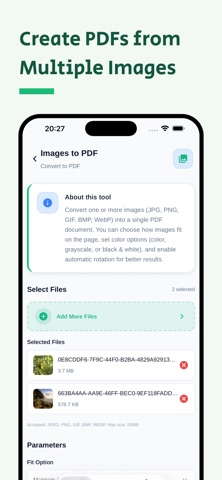
• Convert JPG, JPEG, PNG, BMP, GIF, WEBP, and HEIC photos to high‑quality PDF.
• Merge multiple images into a single PDF or convert pictures individually.
TEXT AND MARKDOWN TO PDF
• Text to PDF: Turn plain TXT files into formatted PDFs.
• Markdown to PDF: Export MD files to beautifully formatted PDFs with preserved styling.
KEY FEATURES
• Fast PDF converter with cloud processing.
• Supports 15+ document and image formats.
• Batch conversion of multiple files simultaneously.
• High‑quality output with smart compression.
• No watermarks on converted PDFs.
• Secure processing — files deleted immediately after conversion.
• Works with all standard PDF readers.
HOW TO CONVERT WITH PDFON
1. Select file type: Word, Excel, Image, Text, or Markdown.
2. Choose files from your device.
3. Tap Convert to PDF.
4. Download and share your PDF.
WHY CHOOSE PDFON
Complete support for document and image conversion needs — whether you need Word to PDF, Excel to PDF, images to PDF, or text to PDF, PDFOn handles it all in one app.
SUBSCRIPTION INFORMATION
PDFOn offers premium features through auto‑renewable subscriptions. Payment is charged to your iTunes Account at confirmation of purchase, and your subscription automatically renews unless auto‑renew is turned off at least 24 hours before the end of the current period. Your account will be charged for renewal within 24 hours prior to the end of the current period. You can manage subscriptions and turn off auto‑renewal in Account Settings after purchase. Any unused portion of a free trial period, if offered, will be forfeited when you purchase a subscription.
Privacy Policy: https://www.pdfon.pro/legal/privacy
Terms of Use (EULA): https://www.apple.com/legal/internet-services/itunes/dev/stdeula