Lexicon-Vocabulary Trainer

Lexicon-Vocabulary Trainer Summary
Lexicon-Vocabulary Trainer is a free, with in-app purchases iOS app in Education by 殿鸣 葛. Released in Dec 2025 (10 months ago). Store last updated Dec 3, 2025
Lexicon-Vocabulary Trainer SDKs Summary
App not yet scanned for SDKs.
0★
Ratings: 0
Screenshots




App Description
Lexicon Dictionary & Memory
Product Positioning
Lexicon is a language learning tool for looking up words, saving them as favorites, memorizing them using the Spaced Repetition System (SRS), and practicing usage. The app is divided into five modules: Search, Notes, Learning (SRS), Practice, and Settings. VIP members unlock more search attempts and AI features.
Features and Experience
Search
Switch between source and target languages for quick switching between them in different learning scenarios.
Smart search history. The last 50 searches are automatically saved and can be cleared with a single tap.
Favorites and Details. On the word details page, you can save words and their definitions, pronunciations, and example sentences.
Notes
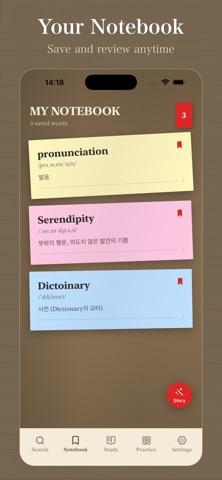
Favorite Management. Manage saved words using sticky notes and view pronunciations, definitions, and example sentences.
Generate AI-generated short stories based on your saved words.
Non-VIP users: Only one generation allowed.
Manage your subscription in iPhone Settings > Apple ID > Subscriptions
-- Privacy Policy: https://www.jianshu.com/p/8f32fc5ee346
VIP users: Up to 50 generation attempts per day.
History. The most recent 50 generated records are saved; you can view or clear them.
Learning (SRS)
SM-2 interval repetition learning plan, offering four feedback options: Learn Again, Hard, Good, Easy. The next review interval is automatically calculated.
Learning cards have two sides. The front focuses on word form and displays images whenever possible. The back displays pronunciation, definition, and example sentences.
Statistics and tips. Displays "Due Today" and "Completed Today". A prompt appears when the review queue is cleared.
Pronunciation playback function helps you correct your accent.
Practice (Contextual Example Sentence Generation)
Three steps: Select from saved words, enter the usage scenario, and select the difficulty level. Up to 10 contextual example sentences can be generated at a time, with translations and audio.
History archiving. Each generated exercise can be saved as a practice record and viewed in a centralized history.
Our advantages over similar apps
Learning-oriented UI structure. Five main tabs directly correspond to actual learning operations, reducing learning friction. Example generation is matched to scenarios and difficulty levels. It's not a generic rewrite, but rath