GPS Tracker: Phone Location

GPS Tracker: Phone Location Summary
GPS Tracker: Phone Location is a free, ad-supported, with in-app purchases iOS app in Lifestyle by AMOBEAR GROUP. Released in Jan 2026 (9 months ago). It has 5.00 ratings with a 3.60★ (average) average. Based on AppGoblin estimates, it reaches roughly 64 monthly active users and generates around $<10K monthly revenue (75% IAP / 25% ads). Store last updated Jun 24, 2026
GPS Tracker: Phone Location SDKs Summary
App not yet scanned for SDKs.
3.6★
Ratings: 5.00
Screenshots


App Description
GPS Tracker: Phone Location
GPS Tracker: Phone Location helps families, couples, and small groups stay connected and safe with live location sharing, smart place alerts, and private location history – all inside a secure, invitation-only circle.
1. Real-time family location sharing
See where everyone is right now on a single, clear map.
The app uses your iPhone’s location services to update each member’s position, even when the app is in the background (if you allow it). When you open the app, you immediately see the latest known location for each person in your circle.
This gives parents peace of mind during school runs, commutes, and late nights, without constant calls or messages asking “Where are you?”.
2. Safe places with automatic arrival and departure alerts
Mark important locations such as Home, School, Work, or any custom address, and the app will automatically notify you when someone arrives or leaves.
You define the place on the map and choose who should trigger alerts. When a member’s device enters or exits that area, a notification is sent to the people you’ve selected.
You’ll know when your child got to school, when your partner arrived at work, or when a family member has safely returned home – so you can relax and focus on other things.
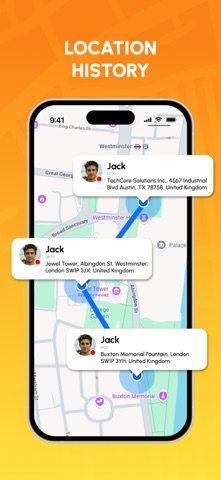
3. Private location history for each member
Review where a family member has been over a recent period of time, presented as a simple location history.
The app records key stops and routes in a private log for your circle only. You choose which member to view and the time range you want to review.
This helps you quickly retrace steps when someone forgets where they’ve been, understand daily routines, or confirm that important journeys were safely completed.
4. Shared family circle and dashboard
Create a private circle, invite your family or trusted group to join, and manage everyone in one place.
One person sets up the circle and sends invitations via link, code, or supported contact methods. Once members join, they appear on the shared map with their chosen name and avatar. You can manage who is in the circle, who shares their location, and who can see whom.
This shared dashboard keeps everyone aligned, simplifies coordination on busy days, and helps both caregivers and family members stay in sync.
5. App permissions
To deliver accurate tracking and timely alerts, GPS Tracke