Watermark & Remover - MarkOff

Watermark & Remover - MarkOff Summary
Watermark & Remover - MarkOff is a free, with in-app purchases iOS app in Photo And Video by Ben Does Apps Ltd. Released in May 2026 (4 months ago). It has 4.00 ratings with a 2.76★ (poor) average. Based on AppGoblin estimates, it reaches roughly 21 monthly active users and generates around $<10K monthly revenue (100% IAP / 0% ads). Store last updated Sep 11, 2026
Recent activity: 1.00 new ratings this week View trends →
Watermark & Remover - MarkOff SDKs Summary
App not yet scanned for SDKs.
2.76★
Ratings: 4.00
Screenshots


App Description
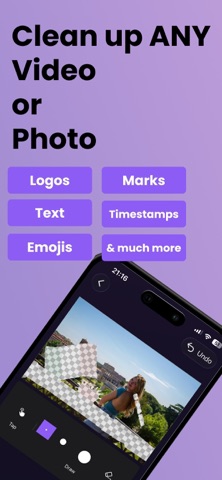
MarkOff is the best way to remove distractions from your photos and videos!
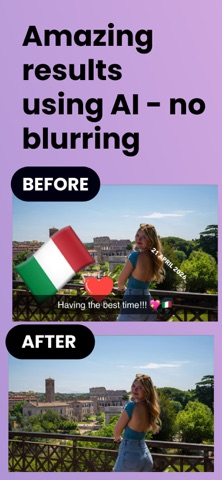
• Uses the latest in AI technology and can handle even large and complex objects without blur!
• Works on any video or photo.
• No need for drawing, just tap the area with the distraction and we will find it for you.
• Save your TikTok videos with a link.
• Handle moving objects on videos with frame-by-frame removal.
• You can also add watermarks to your content whether it's videos or photos.
FAQs
Can I remove unwanted distractions from my photography?
Yes our latest AI can handle even the largest and most complex objects.
Can I remove distractions from my photos and videos downloaded from social media?
Yes you can. For TikTok videos you can save the video using a link. For the others you can select the unwanted area to erase by tapping or drawing and it will be removed using AI so it looks natural (no blur).
Can I remove distractions from my AI generated videos?
Yes absolutely. Whether they're from Sora, Veo, or any other generator, you can select the area to erase by tapping or drawing and it will be removed using AI so it looks natural (no blur).
Can I remove distractions from outputs of my video editing software?
Yes, we can handle these easily. Just tap on the unwanted area.
Can I remove distractions from my AI generated photos?
Yes, just tap on things you want to remove, or draw over them. It gets removed perfectly as if it was never there.
Does MarkOff blur the removed area of the video like other apps?
No, other object removers, especially video ones, just blur the area which looks bad. We use AI for incredible, non-blurry results.
Can Markoff handle distractions in videos that move to different places?
Yes you can have tap/draw different areas to remove for different parts of the video, so you can get rid of things even if it they move or change shape.
Is MarkOff free?
You can try out the app for free to see if it works for you, but to continue to use it you'll need to subscribe to pro.
How can I find out more about MarkOff and how to use it?
Go to our website: https://MarkOff.app
Pro:
• You can subscribe to unlock Pro, which gives you unlimited free access to removing distractions from photos and videos.
• Subscriptions auto-renew at the end of current period, unless cancelled 24-hours in advance prior to the end of the current period. The