MySQL365

MySQL365 Summary
MySQL365 is a with in-app purchases iOS app in Developer Tools by 乐祥 胡. Released in Dec 2025 (9 months ago). Store last updated May 19, 2026
MySQL365 SDKs Summary
App not yet scanned for SDKs.
0★
Ratings: 0
Screenshots


App Description
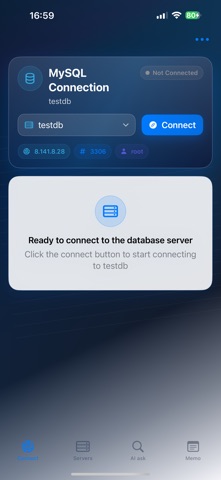
Whether you're a developer, DevOps engineer, or data analyst, MySQL365 allows you to effortlessly manage multiple MySQL database servers anytime, anywhere.
With no complex setup required, connect to your databases with a single tap.
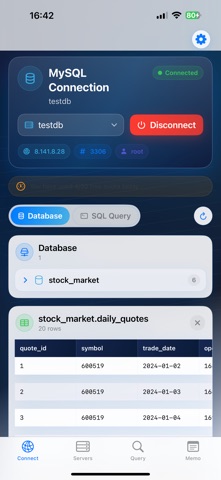
It supports double-click table data preview, SQL query execution, intelligent SQL autocompletion, AI-assisted queries, and an ops memo feature, making database management more efficient and convenient.
Core Features:
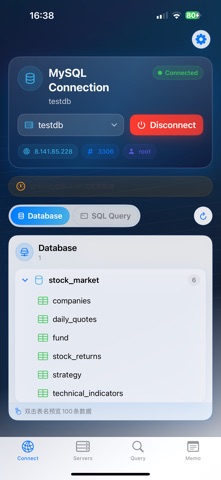
Multi-Database Server Management: Add and switch between multiple MySQL servers in one place, with remote connection support.
Double-Click Table Preview: Intuitively view table structures and data without manually entering queries.
SQL Query & Editing: Execute complex SQL queries.
Smart SQL Autocompletion: Automatically complete table names as you type to improve efficiency.
AI Query Assistant: Quickly access SQL-related technical information.
Ops Memo: Record operational logs, steps, and solutions for easy reference.
Mobile Operations: Connect to databases from your phone anytime, anywhere, enabling remote management at any time and place.
Use Cases:
Development & Debugging
Data Analysis
Remote Operations
Team Collaboration
Download MySQL365 and make database management accessible at your fingertips!
—Subscription Plans & Auto-Renewal Info
Flexible Subscription Plans for Every Need! Choose the perfect plan for your goals with our diverse subscription options:
* 1 Month: Ideal for project-based users
* 1 Year: Best value for committed users
* Lifetime: One-time purchase, forever access
—Auto-Renewal Details:
* Payment will be charged to your iTunes Account at confirmation of purchase.
* Subscriptions are billed month,year based on your chosen plan.
* Subscriptions auto-renew within 24 hours before the current period ends (except Lifetime).
* Renewal charges will be processed within 24 hours before the end of the current period, with the cost depending on your selected plan.
* Manage subscriptions or turn off auto-renewal anytime via your Apple ID Account Settings.
—Lifetime Membership Perks:
* Pay once, unlock all features forever—no renewals, no hassle!
Note:
* Manage subscriptions at: Settings > [Your Name] > Subscriptions
— Privacy Policy please visit:
https://docs.qq.com/doc/DREt1SXJkbG9JYUFT
* **Terms of use (EULA):
* https://docs.qq.com/doc/DREdKR2ZwYUJaa1hr
*
* **Terms of a