PC View Mode for Safari

PC View Mode for Safari Summary
PC View Mode for Safari is a mobile iOS app in Tools by Seiya.k. Released in Dec 2025 (9 months ago). Store last updated Sep 25, 2026
PC View Mode for Safari SDKs Summary
App not yet scanned for SDKs.
0★
Ratings: 0
Screenshots



App Description
Safari's "Request Desktop Website" not working on your iPhone or iPad?
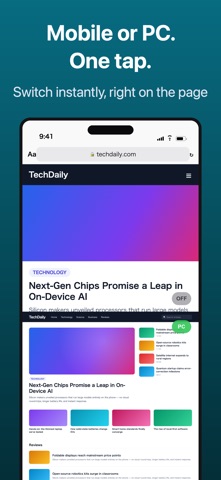
PC View Mode for Safari is a Safari extension that shows websites in their desktop layout by changing both the User-Agent and the page width.
Unlike Safari's built-in desktop website option, PC View Mode also lets you set the page width to 1024px, 1280px, or 1440px.
▼ Common Problems PC View Mode Solves
Safari still shows the mobile website after requesting the desktop version.
Some websites continue to display their mobile layout even when you select "Request Desktop Website" in Safari.
PC View Mode changes both the User-Agent and the page width, so the desktop layout appears.
I want to view the full desktop website on my iPhone.
Mobile layouts hide navigation menus, rearrange content, and make desktop-oriented websites hard to use.
PC View Mode lets you open websites using a desktop-sized page width.
My iPad keeps showing the mobile version of websites.
Even on an iPad, some websites show their mobile layout.
PC View Mode lets you choose a desktop page width to make better use of your iPad's screen.
I need to access a desktop-oriented dashboard or admin panel on my iPhone.
Some dashboards, booking systems, and business tools are designed for desktop browsers.
PC View Mode displays their desktop layouts directly in Safari on your iPhone or iPad.
I want to see menus and buttons hidden by the mobile layout.
Many websites hide navigation menus and interface elements in their mobile layouts.
With PC View Mode, the desktop navigation and controls appear.
I want specific websites to always open in desktop mode.
Tired of requesting the desktop version every time you visit the same website?
PC View Mode remembers your settings for each website and automatically applies them the next time you visit.
I want a Safari desktop mode extension without ads or data collection.
PC View Mode for Safari is a one-time purchase with no ads and no data collection.
You can also return to the original website display with a single tap.
Note: Desktop layouts and desktop-only features may not be available on every website.
▼ What it does
· Tap the button once and the site switches to its desktop layout
· The site is remembered, so it opens in desktop view automatically from then on
· Tap the same button again to go back to the mobile layout
▼ Why it works where Safari's built-in option doesn'